
청소기를 켜는 순간 모니터가 꺼졌습니다
청소기 켜면 모니터 꺼짐 현상은 생각보다 당황스럽습니다. 청소기 스위치를 누른 바로 그때 화면이 검게 변하고, 잠시 뒤 제조사 로고부터 다시 나온다면 모니터 고장만 먼저 의심하기 쉽습니다.
두 제품이 같은 멀티탭에 연결돼 있었다면 전원이 지나가는 길부터 나눠서 볼 필요가 있습니다. 청소기와 모니터는 소비전력도 다르고 전기를 쓰는 방식도 다릅니다. 특히 청소기는 모터가 멈춘 상태에서 회전을 시작하는 아주 짧은 순간에 평소보다 큰 전류를 끌어올 수 있습니다.
이때 멀티탭 전선과 플러그, 벽 콘센트처럼 두 제품이 함께 쓰는 구간에서 전압이 잠깐 흔들리면 모니터가 전원이 끊겼다가 다시 들어온 것처럼 반응할 수 있습니다. 다만 화면이 검게 변했다는 사실만으로 원인을 단정하지는 않습니다.
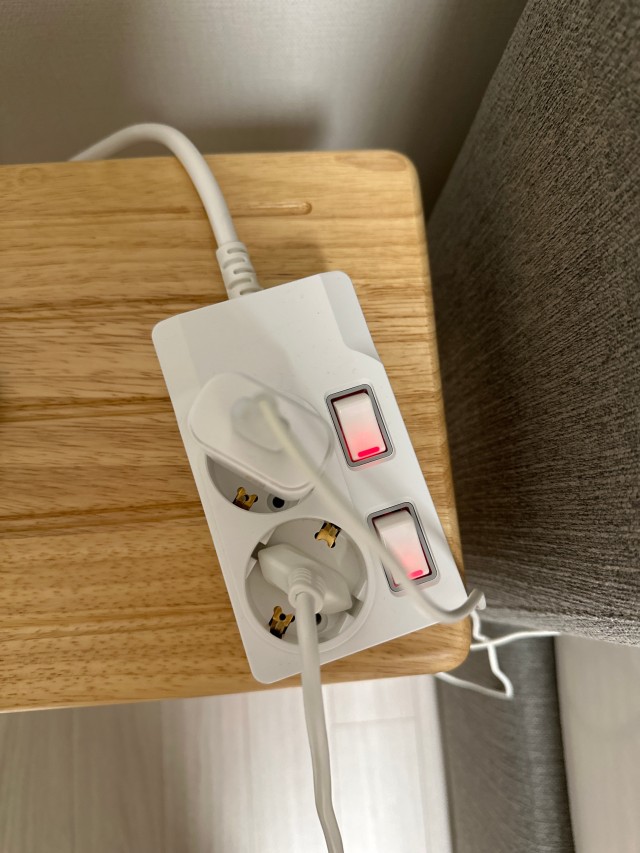
청소기는 시작할 때 힘을 더 씁니다
청소기가 정상 속도로 돌아갈 때는 비교적 일정하게 전기를 사용합니다. 하지만 멈춰 있던 모터를 처음 돌리는 순간에는 더 큰 전류가 필요할 수 있습니다. 이를 기동 순간 부하라고 부르지만, 쉽게 말하면 청소기가 출발할 때 잠깐 힘을 더 쓰는 것입니다.
모터 방식과 제어 방식에 따라 그 크기와 지속시간은 달라집니다. 모든 청소기가 똑같은 배수의 전류를 쓴다고 말할 수는 없습니다. 중요한 점은 제품에 적힌 평소 소비전력만 더해서 3,200W 아래라고 해도 이 짧은 변화까지 사라지는 것은 아니라는 사실입니다.
멀티탭과 벽 콘센트의 접촉 상태가 좋고 전원 연결에 여유가 있다면 별다른 증상 없이 지나갈 수 있습니다. 반대로 플러그가 헐겁거나 내부 접점이 닳고 전선이 눌려 손상됐다면 같은 청소기를 켜도 전압이 더 크게 흔들릴 수 있습니다.

모니터 전원이 다시 시작되는 이유
모니터 안에는 벽에서 들어온 전기를 화면과 회로에 맞게 바꾸는 전원부가 있습니다. 들어오는 전압이 아주 짧게 낮아져 전원부가 버티지 못하면 모니터는 전원이 꺼졌다가 다시 켜진 것처럼 재시작할 수 있습니다.
전원 표시등까지 꺼졌다 켜지고 제조사 로고나 입력 검색 화면이 처음부터 나온다면 전원 재시작에 가깝습니다. 컴퓨터 본체는 계속 켜져 있는데 모니터만 다시 부팅될 수도 있습니다. 각 기기의 전원부가 짧은 전압 변화에 견디는 정도가 서로 다르기 때문입니다.
이 현상이 반복된다면 단순한 불편으로 넘기지 않습니다. 오래된 멀티탭, 헐거운 콘센트 구멍, 끝까지 들어가지 않는 플러그, 벽 콘센트 접촉 불량이 순간적인 전압 변화를 키울 수 있습니다. 타는 냄새나 빠른 발열이 함께 나타나면 바로 사용을 멈춥니다.


화면만 깜빡였다면 구분이 필요합니다
모니터 전원 표시등은 계속 켜져 있고 작업 화면만 잠깐 사라졌다면 전원 재시작과 다른 문제일 수 있습니다. HDMI나 DP 케이블 접촉, 그래픽 출력, 입력 신호 전환, 청소기 모터에서 생기는 전기적 간섭도 후보가 됩니다.
전원 표시등이 꺼졌는지, 제조사 로고부터 다시 나왔는지, 화면에 신호 없음이 표시됐는지, 컴퓨터는 계속 작동했는지를 기억해 둡니다. 이 네 가지를 나누면 전원 문제와 영상 신호 문제를 훨씬 쉽게 좁힐 수 있습니다.
화면만 깜빡였다면 모니터와 컴퓨터의 전원을 끈 뒤 영상 케이블 양쪽을 다시 단단히 연결합니다. 케이블이 가구에 눌리거나 심하게 꺾이지 않았는지도 봅니다. 청소기 전선과 영상 케이블을 붙여 두지 않고 거리를 둔 상태에서도 같은 증상이 생기는지 살핍니다.

같은 멀티탭의 모든 플러그를 봅니다
컴퓨터 책상에는 모니터만 연결돼 있지 않은 경우가 많습니다. 데스크톱 본체, 스피커, 공유기, 충전기, 프린터가 한 멀티탭에 모여 있을 수 있습니다. 빈 콘센트 구멍이 남았다는 것과 전력 여유가 남았다는 것은 전혀 다른 이야기입니다.
연결한 모든 기기의 표시 소비전력을 더하고, 동시에 켜지는 제품을 중심으로 봅니다. 청소기를 같은 멀티탭에 꽂는 순간 총합이 크게 올라갈 수 있습니다. 여기에 청소기의 기동 순간 부하가 겹치면 숫자만으로는 보이지 않던 전원 흔들림이 나타날 수 있습니다.
플러그가 끝까지 들어갔는지, 특정 구멍만 헐겁지 않은지, 본체와 플러그에 변색이나 녹은 흔적이 없는지도 봅니다. 지지직거리는 소리, 타는 냄새, 손대기 어려울 만큼 빠른 발열이 있다면 시험을 반복하지 말고 즉시 사용을 중단합니다. 멀티탭에 손상이 있으면 새 제품으로 교체하고, 벽 콘센트도 뜨겁거나 헐거우면 전기 전문가에게 점검을 맡깁니다.
PC 책상 위에 올려두기엔 최고입니다.
nmc*******
청소기는 벽 콘센트에 직접 연결합니다
가장 먼저 바꿀 것은 연결 위치입니다. 청소기는 정상 상태의 벽 콘센트에 직접 연결하고, 컴퓨터와 모니터는 기존 멀티탭에 둡니다. 청소기까지 책상용 멀티탭에 함께 꽂는 방식은 피합니다.
청소기를 분리한 뒤 모니터 꺼짐이 사라진다면 같은 전원 경로에서 생긴 순간 부하의 영향을 의심할 수 있습니다. 그래도 원인이 확정된 것은 아닙니다. 다른 벽 콘센트도 같은 차단기에 연결된 하나의 회로일 수 있기 때문입니다.
청소기를 다른 벽 콘센트에 연결해도 여러 자리에서 같은 증상이 반복된다면 멀티탭만 계속 바꾸지 않습니다. 벽 콘센트와 건물 배선, 모니터 전원부 또는 청소기 상태를 전기 전문가나 제품 서비스센터에서 점검받는 것이 안전합니다.

부득이한 연장에는 조건이 있습니다
청소기 설명서가 멀티탭이나 연장선 사용을 금지한다면 벽 콘센트에 직접 연결합니다. 벽에서 거리가 멀다는 이유만으로 가느다란 연장선이나 오래된 멀티탭을 사용하는 것은 해결책이 아닙니다.
설명서가 멀티탭 사용을 금지하지 않는 경우에만, 부득이한 상황에서 청소기의 소비전력과 사용 조건에 맞는 고용량 멀티탭을 사용합니다. 제품 이름에 적힌 고용량이라는 말보다 실제 정격전압, 정격전류와 허용전력을 봅니다.
고용량 멀티탭도 벽 속 배선이나 헐거운 벽 콘센트를 고쳐 주지는 못합니다. 멀티탭에 또 다른 멀티탭을 연결하지 않고, 전선을 감아 둔 채 사용하거나 가구와 문틈으로 누르지 않습니다.

3,200W는 멀티탭 전체의 합계입니다
써보니 일반 멀티탭은 국내 220V 환경에서 연결한 가전의 전체 합산 소비전력 3,200W 이내 사용을 권장합니다. 4구나 6구 제품이라도 콘센트 한 구마다 3,200W를 쓸 수 있다는 뜻은 아닙니다.
모니터, 컴퓨터 본체, 프린터, 충전기와 청소기의 소비전력을 모두 하나의 합계로 봅니다. 정격 한계에 바짝 맞추는 것보다 여유를 두고, 모터가 있는 제품은 컴퓨터 주변 기기와 전원길을 나누는 편이 안전합니다.
3,200W 이내라는 숫자가 멀티탭 상태까지 보증하는 것도 아닙니다. 전선 피복이 갈라지거나 플러그가 헐겁고 접점이 닳았다면 합산 소비전력이 낮아도 교체해야 합니다. 차단기가 내려가지 않았다는 사실만으로 안전하다고 판단하지 않습니다.
멀티탭 교체주기 1~2년도 살핍니다
써보니는 멀티탭을 실제로 사용하기 시작한 뒤 1~2년 주기로 교체할 것을 권합니다. 매일 플러그를 꽂고 빼는 책상 주변은 접점 마모와 먼지, 전선 눌림이 쌓이기 쉬워 사용 시작일을 적어 두는 것이 좋습니다.
1~2년은 법으로 정한 사용기한도, 모든 멀티탭의 수명이 정확히 같다는 뜻도 아닙니다. 오래 사용하며 쌓이는 열과 접점 마모를 놓치지 않기 위한 써보니의 관리 기준입니다.
사용한 지 1년이 되지 않았더라도 청소기를 켤 때마다 모니터가 재시작되고, 멀티탭에서 열이나 냄새, 소리, 변색, 헐거움이 발견된다면 기간을 채우지 않습니다. 이상이 있는 제품은 바로 사용을 멈추고 새 제품으로 교체합니다.
한 번의 꺼짐이 알려주는 연결 습관
청소기를 켤 때 모니터가 꺼진다면 먼저 청소기를 벽 콘센트로 분리합니다. 모니터 전원 표시등과 제조사 로고를 보고 전원 재시작인지, 화면 신호만 끊긴 것인지 나눕니다. 그다음 영상 케이블과 플러그 상태, 멀티탭 사용기간을 차례로 봅니다.
써보니는 제품별 정격과 인증 기준에 맞춰 전선과 플러그, 접지와 스위치 구조를 꼼꼼하게 만듭니다. 제대로 만든 멀티탭도 어떤 가전을 함께 연결하느냐와 사용 환경에 따라 상태가 달라지므로 정격과 교체주기를 함께 지켜야 합니다.
콘센트 구 수를 늘리는 것보다 어떤 가전을 함께 연결하는지가 더 중요합니다. 청소기는 벽 콘센트에 직접 연결하고, 컴퓨터와 모니터는 상태가 좋은 멀티탭에 따로 연결합니다.
Why a Vacuum Can Affect a Monitor at Startup
A monitor that goes black at the exact moment a corded vacuum starts can appear to have a display fault. The timing, however, makes the shared power path worth checking first. A vacuum and a monitor use electricity in very different ways. The monitor is a relatively steady electronic load, while the vacuum contains a motor that must accelerate from a standstill.
The motor and control design affect startup behavior. The vacuum may briefly draw more current during startup than it uses after reaching normal speed. This is often called starting current or inrush current. The size and duration are not identical for every vacuum. Electronic control, soft start, inverter control, and different motor types can all change the result. A fixed multiplier should not be claimed for every product.
That brief current passes through the power strip cord, plug, wall receptacle, and household wiring. Resistance and impedance along this path can let the available voltage dip for a moment. A sound installation may pass through the event without any visible effect. A loose plug or worn receptacle can make the dip more noticeable. A damaged cord, long shared path, or already heavily loaded circuit can do the same.
A monitor power supply can interpret a sufficiently deep or long dip as an interruption. It may shut down and restart when stable input returns. The screen can therefore go dark and the manufacturer logo can appear again. The desktop computer may continue running at the same time. Different power supplies have different tolerance for a short disturbance.
A Power Restart Is Different From a Signal Flicker
Do not diagnose every black screen as the same problem. Watch the monitor’s power indicator. If the indicator turns off and then returns, the monitor probably restarted. A startup logo or input search sequence makes this explanation more likely. That pattern supports checking the power source, connections, and shared load.
If the power indicator remains on while only the picture disappears, the video path also deserves attention. An HDMI or DisplayPort cable can be loose, damaged, sharply bent, or pressed by furniture. The computer can briefly lose video output, and a nearby motor can introduce electrical interference. Input switching, graphics settings, drivers, and refresh-rate settings are additional possibilities.
Record four details when the symptom occurs. Note the power indicator, startup logo, any no-signal message, and whether the computer kept running. These observations are more useful than describing every event simply as the monitor turning off.
For picture-only flicker, turn off the computer and monitor before reseating power and video cables. Inspect the cable and connector for damage. Keep the signal cable away from the vacuum cord. Test with a known-good cable or another input if available. If the monitor completely restarts, begin by separating the vacuum from the computer power strip.
The Shared Path Can Extend Beyond One Power Strip
Devices connected to one power strip share several parts. These include its cord, plug, internal conductors, contacts, and the wall receptacle feeding it. A high startup current from the vacuum crosses this common section before reaching the household circuit. Increased resistance at a worn or loose connection can produce a larger local voltage drop and unwanted heating.
Moving the vacuum to another wall receptacle is a useful test. However, a different receptacle does not always mean a different circuit. Several receptacles can be supplied by the same branch circuit and protected by the same breaker. The devices may still share wiring even when they are plugged into separate locations.
Start with one simple change. Keep the computer and monitor on their existing suitable strip. Connect the vacuum directly to a sound wall receptacle. If the symptom stops, the previous shared power path was likely involved. This result still does not identify one component with certainty.
The issue can persist when the vacuum is used from several receptacles. Possible causes then include a shared branch circuit, wall receptacle, building wiring, vacuum, or monitor power supply. The monitor adapter can also be involved. Do not open the electrical panel or dismantle the devices. Ask a qualified electrician or the relevant service center to evaluate persistent disturbances.
Wall Connection First and Extension Only With Conditions
A corded vacuum should be connected directly to a sound wall receptacle whenever practical. Follow the vacuum manufacturer’s instructions. If the manual requires direct connection or prohibits a power strip or extension cord, that requirement comes first.
First confirm that the instructions do not prohibit extension. Use a high-capacity product only when direct connection is genuinely impractical. Select it for the vacuum’s wattage, voltage, current, cord length, and operating conditions. The words high capacity on a product name are not enough. Read the marked electrical rating and use a properly certified product.
Do not connect one power strip to another. Do not leave the cord tightly coiled or route it under a rug. Keep furniture and doorways from crushing or pinching the cord. A higher-capacity strip cannot repair a loose wall receptacle or inadequate household circuit. It also cannot guarantee that a monitor disturbance will disappear.
Stop testing immediately if a plug or receptacle becomes abnormally hot. Burning odor, crackling, melted plastic, looseness, or repeated breaker operation also require stopping. Disconnect only when it is safe to do so. Continued smoke, flame, or an electrical fire requires safe power isolation when possible and emergency assistance.
Total Load, Condition, and the Replacement Calendar
Subony recommends a total connected load within 3,200W for its general-purpose strips in Korea’s 220V environment. The figure applies to the entire strip, not to each outlet. Add the marked consumption of the computer, monitor, printer, and speakers. Include chargers and any other device that can operate at the same time.
Remaining under the normal-load total does not erase motor startup behavior or the condition of the connections. A brief voltage dip can still occur when a motor starts, especially where a plug, receptacle, or cord is worn. Leave practical margin instead of treating the marked limit as a target.
Subony recommends replacing a power strip within one to two years after regular use begins. This is a maintenance guideline, not a statutory expiration date. It does not guarantee that every product remains safe until a particular day. Dust, frequent plug changes, heat, cord pressure, and contact wear vary from one installation to another.
Condition overrides the calendar. Replace the strip earlier if there is looseness, cracking, discoloration, melting, abnormal heat, buzzing, crackling, or a burning smell. A repeated monitor restart during vacuum startup calls for a different connection arrangement. Inspect the power path instead of waiting for a breaker to trip.
Several safety choices work together. They include a well-made strip, correct total load, direct wall connection, proper cable routing, and planned replacement. The goal is not to blame every flicker on the power strip. Separate motor loads from sensitive electronics. Recognize warning signs and use each connection for a suitable job.
추가 정보
청소기와 모니터 전원 문제 핵심
청소기 모터는 시작되는 짧은 순간 정상 운전 중보다 큰 전류를 끌어올 수 있습니다. 같은 전원길의 상태가 좋지 않으면 전압이 잠깐 흔들리고 모니터 전원부가 재시작할 수 있습니다.
전원 표시등과 제조사 로고가 다시 나타났다면 전원 재시작에 가깝습니다. 표시등은 살아 있고 화면만 사라졌다면 HDMI나 DP 케이블, 그래픽 출력과 전기적 간섭도 살핍니다.
청소기는 벽 콘센트 직접 연결이 우선입니다. 설명서가 멀티탭 사용을 금지하지 않는 경우에만 부득이한 상황에서 소비전력과 조건에 맞는 고용량 멀티탭을 사용합니다.
증상별 첫 점검
| 증상 | 먼저 볼 곳 | 첫 조치 |
|---|---|---|
| 전원 표시등도 꺼짐 | 공유 전원과 플러그 접촉 | 청소기를 벽 콘센트로 분리 |
| 화면만 잠깐 사라짐 | HDMI와 DP 케이블 | 전원을 끄고 케이블 재연결 |
| 신호 없음 표시 | 영상 입력과 컴퓨터 출력 | 다른 입력이나 정상 케이블 시험 |
| 열과 냄새가 함께 남 | 멀티탭과 벽 콘센트 | 즉시 사용 중단 |
| 다른 자리에서도 반복 | 같은 분기회로와 기기 상태 | 전문 점검 요청 |
자주 묻는 질문
청소기를 켜면 같은 멀티탭의 모니터가 왜 꺼지나요?
청소기 모터가 시작되는 짧은 순간 큰 전류를 끌어오면서 전원 상태가 흔들릴 수 있습니다. 멀티탭이나 플러그 접촉 상태가 좋지 않으면 모니터 전원부가 재시작할 수 있습니다.
청소기 소비전력이 3,200W보다 낮아도 모니터가 꺼질 수 있나요?
가능합니다. 3,200W는 정상 작동 소비전력의 전체 합계를 관리하는 기준이며, 짧은 기동 순간 부하나 낡은 접점의 영향까지 없애는 숫자는 아닙니다.
모니터 재시작과 화면 깜빡임은 어떻게 나누나요?
전원 표시등까지 꺼지고 제조사 로고부터 다시 나오면 전원 재시작에 가깝습니다. 표시등은 켜진 채 화면만 사라졌다면 영상 케이블과 그래픽 출력도 살핍니다.
청소기와 컴퓨터를 같은 멀티탭에 연결해도 되나요?
청소기는 정상 상태의 벽 콘센트에 직접 연결하는 것이 우선입니다. 컴퓨터와 모니터가 연결된 책상용 멀티탭에 청소기까지 함께 꽂는 방식은 피합니다.
벽 콘센트가 멀면 고용량 멀티탭을 사용해도 되나요?
청소기 설명서가 멀티탭 사용을 금지하지 않는 경우에만 가능합니다. 부득이한 상황에서는 청소기 소비전력과 조건에 맞는 고용량 제품을 사용하고 여러 멀티탭을 이어 연결하지 않습니다.
멀티탭의 3,200W는 콘센트 한 구마다 적용되나요?
아닙니다. 멀티탭 전체에 연결된 모든 기기의 소비전력을 합한 값입니다. 빈 구가 남아 있어도 전체 허용 범위가 늘어나지 않습니다.
청소기를 벽 콘센트로 옮겼는데도 모니터가 꺼지면 어떻게 하나요?
모니터 전원선과 영상 케이블, 벽 콘센트 상태를 차례로 봅니다. 여러 벽 콘센트에서도 반복되거나 차단기가 작동한다면 전기 설비 또는 기기 점검을 받습니다.
멀티탭이 뜨겁거나 지지직 소리가 나면 계속 써도 되나요?
사용을 즉시 중단합니다. 타는 냄새, 변색, 비정상적인 열, 소리와 헐거움은 사용기간이 남아 있어도 새 제품으로 교체할 신호입니다.
멀티탭은 몇 년마다 교체하나요?
써보니는 실제 사용을 시작한 뒤 1~2년 주기로 교체할 것을 권합니다. 열과 습기, 먼지가 많거나 플러그를 자주 바꿔 꽂는 자리에서는 더 일찍 교체할 수 있습니다.
새 멀티탭으로 바꾸면 모니터 꺼짐이 반드시 해결되나요?
반드시 그렇지는 않습니다. 낡은 멀티탭이 원인일 수 있지만 모니터 전원선, 영상 케이블, 벽 콘센트와 같은 분기회로의 문제도 가능합니다. 청소기를 먼저 벽 콘센트로 분리합니다.
점검 기준 확장
전원 표시등
표시등이 꺼졌다 켜지는지, 제조사 로고가 다시 나오는지 기억합니다. 전원 재시작을 나누는 가장 쉬운 단서입니다.
공유 전원길
같은 멀티탭뿐 아니라 같은 차단기에 연결된 벽 콘센트도 일부 배선을 함께 쓸 수 있습니다.
고용량 제품
가전 설명서가 허용하는 경우에만 부득이한 연장에 사용합니다. 고용량 멀티탭도 헐거운 벽 콘센트나 건물 배선을 고치지는 못합니다.
교체 기준
사용 시작 후 1~2년을 기준으로 관리하고, 열과 냄새, 소리, 변색과 헐거움이 있다면 날짜보다 먼저 새 제품으로 교체합니다.