
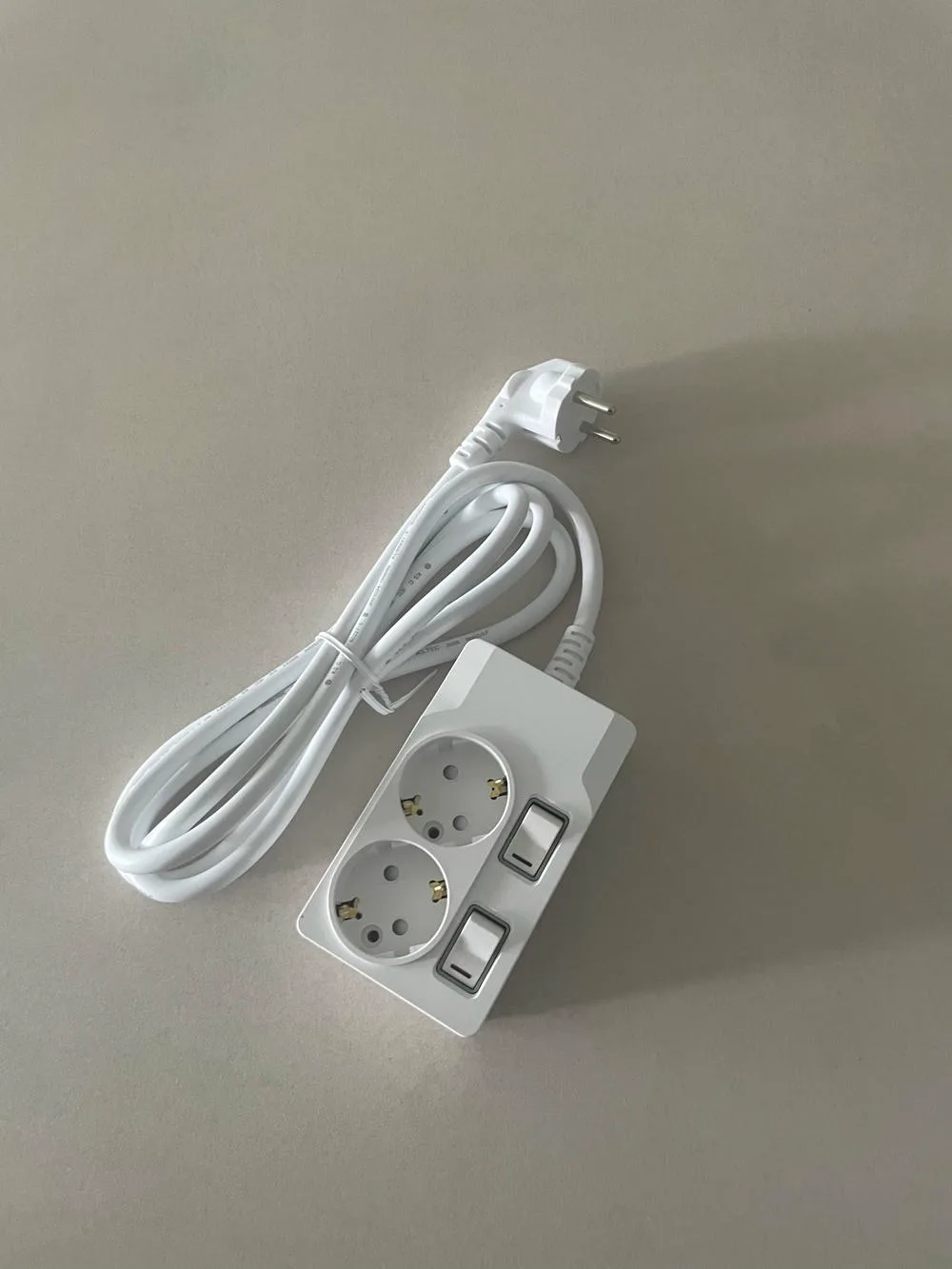
가전이 이상한 게 아니라 연결이 흔들리는 순간
TV 화면이 잠깐 깜빡이거나, 충전기가 꽂혀 있는데도 충전 표시가 늦게 뜨거나, 공유기 전원이 한 번씩 꺼졌다 켜지는 것처럼 보일 때가 있습니다. 그럴 때 대부분은 기기부터 의심합니다. TV가 오래됐나, 충전기가 고장인가, 어댑터를 바꿔야 하나 하고 생각이 그쪽으로 먼저 갑니다.
그런데 실제 생활에서는 가전 자체보다 전원 연결 상태가 먼저 흔들리는 경우도 꽤 있습니다. 플러그가 끝까지 단단히 맞물리지 않았거나, 멀티탭 본체가 바닥에서 비스듬히 놓였거나, 무거운 어댑터가 한쪽으로 눌리면서 접점이 불안해지는 상황입니다. 이런 문제는 크게 눈에 띄지 않습니다. 기기는 켜져 있고, 스위치 불도 들어와 있으니 대수롭지 않게 지나가기 쉽습니다.
그래서 멀티탭 연결은 단순히 콘센트 수를 늘리는 문제로 끝나지 않습니다. 플러그가 어떻게 꽂히는지, 접지 단자가 제대로 맞는지, 스위치와 본체가 흔들림 없이 버티는지, 전선이 당겨지지 않는 위치에 놓였는지까지 함께 이어집니다. 좋은 멀티탭은 이 작은 연결의 불안을 줄여주는 쪽에 가깝습니다.
플러그 체결감은 생각보다 빨리 티가 납니다
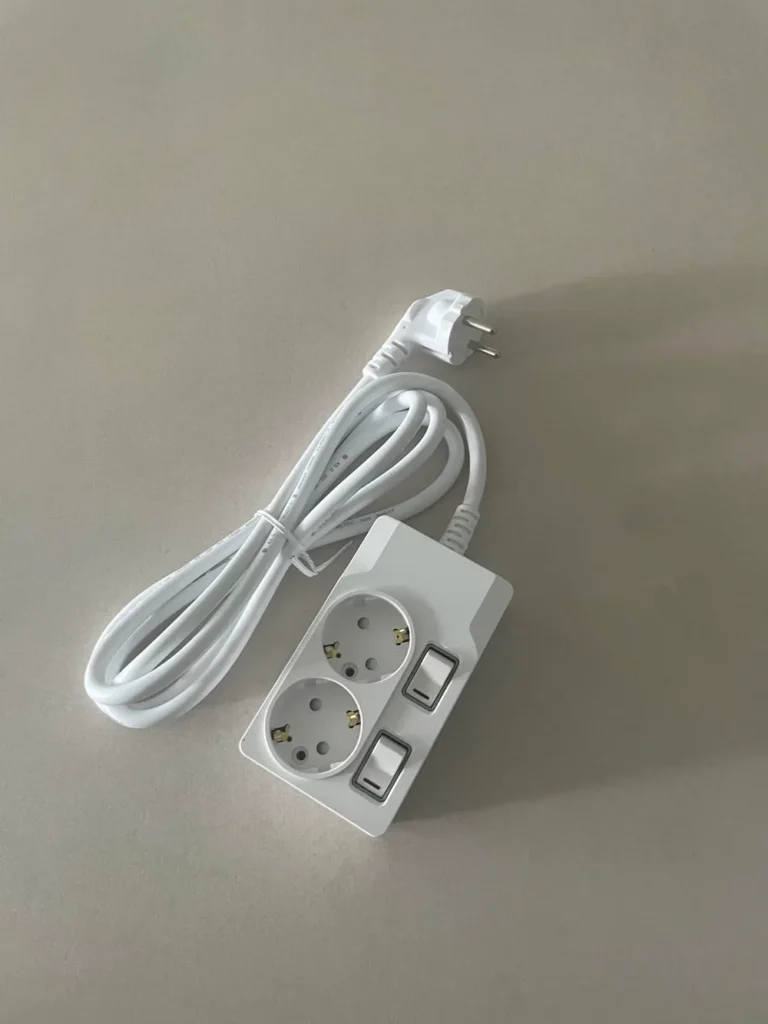
멀티탭을 새로 꺼냈을 때 가장 먼저 느껴지는 부분은 플러그가 들어가는 감각입니다. 헐겁게 쑥 들어가고 살짝만 건드려도 흔들리는 제품이 있고, 꽂는 순간 단단하게 잡히는 제품이 있습니다. 이 차이는 설명서보다 손에서 먼저 느껴집니다. 책상 아래처럼 손을 깊게 넣어 꽂는 자리에서는 더 분명하게 다가옵니다.
플러그가 흔들리면 사용자는 같은 행동을 반복합니다. 다시 꾹 눌러 꽂고, 어댑터 위치를 돌려보고, 혹시 빠지는 건 아닌지 눈으로 확인합니다. 특히 노트북 어댑터, 공유기 전원, TV 주변 기기처럼 계속 켜두는 제품은 연결이 불안하게 느껴지는 순간부터 마음이 편하지 않습니다. 가전 수명이 어떻다는 말을 꺼내기 전에, 전기가 들어가는 입구가 안정적인지부터 살피게 됩니다.
써보니 멀티탭은 접지 단자와 콘센트 구조, 개별스위치 구성, 본체 마감이 함께 보이는 제품입니다. 플러그를 자주 뺐다 꽂는 자리라면 체결감은 더 중요해집니다. 충전기처럼 가벼운 플러그부터 부피가 있는 어댑터까지 함께 쓰는 공간에서는 멀티탭 본체가 가볍게 밀리지 않는지도 같이 보게 됩니다.
어댑터가 몰리는 자리에서는 접점이 더 예민해집니다
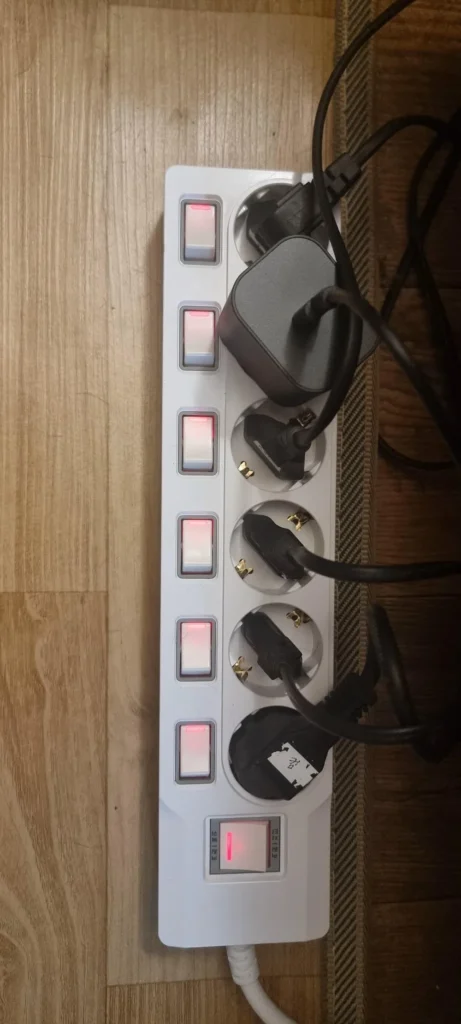
요즘 집에는 작은 어댑터가 정말 많습니다. TV장 뒤에는 셋톱박스, 공유기, 게임기, 스피커 전원이 모이고, 책상 주변에는 노트북 어댑터와 모니터, 조명, 충전기가 함께 놓입니다. 문제는 어댑터들이 전부 같은 방향으로 예쁘게 꽂히지 않는다는 점입니다. 어떤 플러그는 옆 콘센트를 가리고, 어떤 어댑터는 무게 때문에 한쪽으로 기울어집니다.
이때 멀티탭 본체와 콘센트 구조가 약하면 연결부가 더 불안하게 느껴집니다. 플러그가 비스듬히 눌리고, 전선이 한쪽으로 당겨지고, 바닥에 놓인 본체가 조금씩 밀리면 가전이 문제가 아니라 전원 연결부가 먼저 지저분해집니다. 겉으로는 단순한 전선 정리 문제처럼 보이지만, 실제로는 전원 환경의 기본 자리를 다시 잡아야 하는 상황입니다.
개별스위치 멀티탭은 이런 공간에서 꽤 현실적인 선택입니다. 자주 쓰지 않는 기기는 스위치로 꺼두고, 상시 연결해야 하는 기기는 따로 남겨둘 수 있습니다. 다만 스위치가 많다고 무조건 충분한 것은 아닙니다. 플러그 간격, 어댑터 크기, 전선 방향, 본체를 놓을 자리가 함께 맞아야 실제 사용에서 덜 번거롭습니다.
접지 구조와 스위치는 눈에 보이는 기준입니다
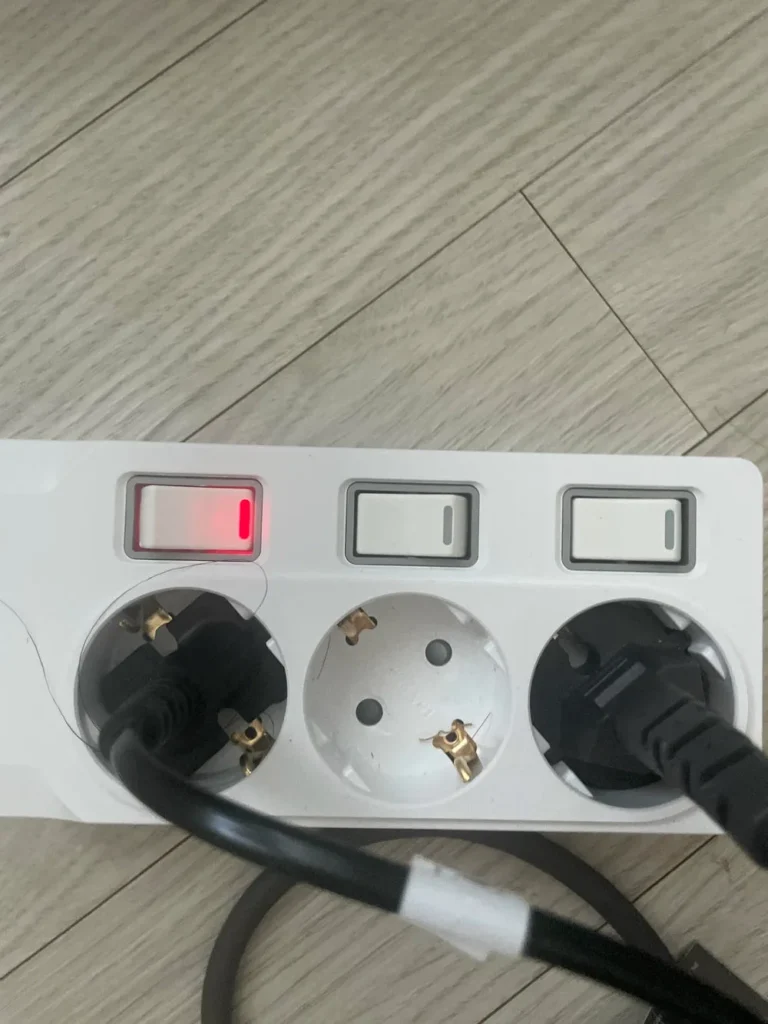
멀티탭 콘센트 안쪽의 금속 접지 단자는 그냥 지나치기 쉬운 부분입니다. 하지만 접지 멀티탭을 고르는 사람이라면 이 구조를 먼저 확인하게 됩니다. 멀티탭 자체의 접지 구조와 벽 콘센트 환경이 함께 맞아야 전원 연결을 더 안정적으로 구성할 수 있습니다. 멀티탭 하나로 집 안 전기 환경이 전부 바뀌는 것은 아니지만, 제품을 고르는 단계에서 접지 구조가 보이는지 확인하는 일은 충분히 의미가 있습니다.
스위치도 마찬가지입니다. 개별스위치 멀티탭은 단순히 불이 들어오는 부품이 아니라 매일 손으로 누르는 부분입니다. 눌렀을 때 너무 헐겁거나, 덜컥거림이 크게 느껴지거나, 오래 쓰기 전부터 가벼운 느낌이 강하면 손이 덜 갑니다. 스위치가 단정하게 맞물려 있고 불빛이 과하지 않으면 책상 아래나 침실 옆에서도 부담이 적습니다.
써보니 전 제품은 16A 250V 기준으로 구성되어 있습니다. 제품군에 따라 2구, 3구, 개별스위치, USB, 고용량 라인처럼 용도가 나뉘고, 사용 공간에 맞게 고르는 흐름이 자연스럽습니다. 같은 멀티탭이라도 침실 충전 공간과 거실 TV장, 다용도실 고전력 가전 주변은 선택 기준이 달라집니다.
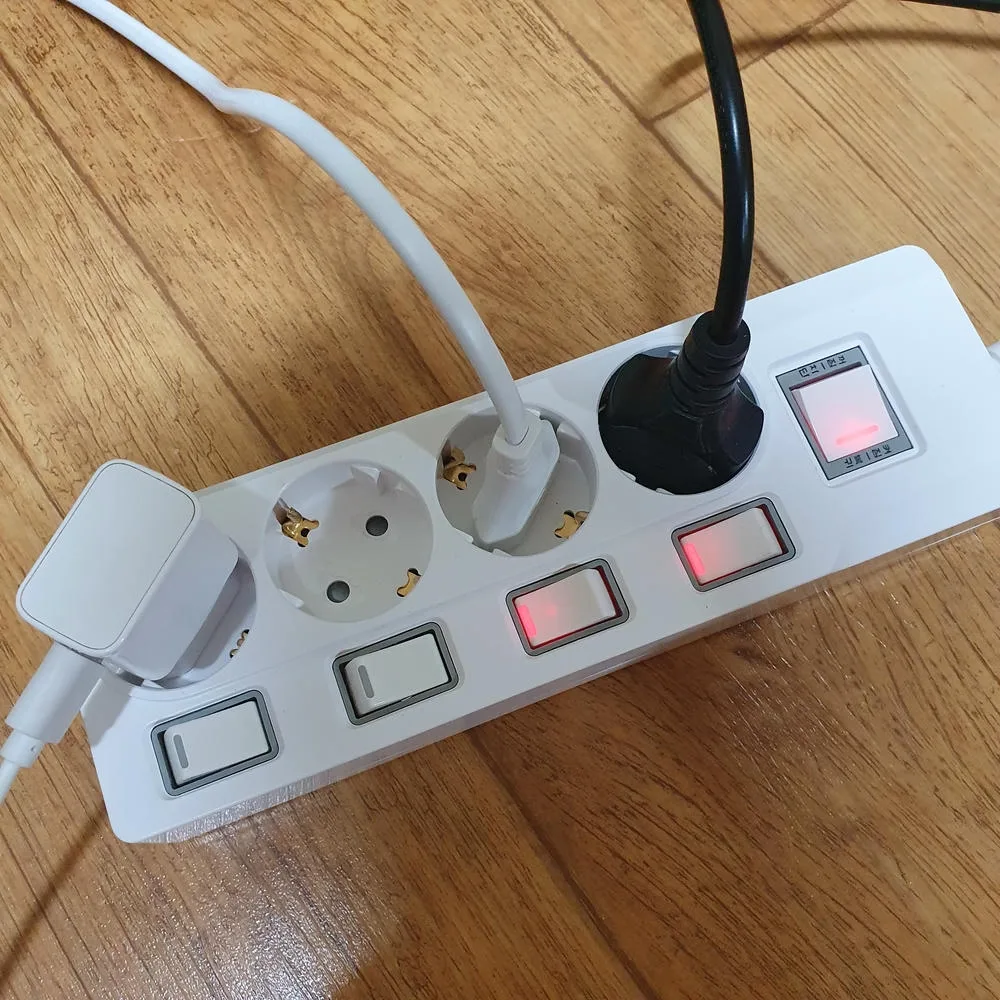
TV장 뒤에 어댑터가 많아서 플러그가 자꾸 비스듬히 들어가는 느낌이 있었는데, 멀티탭을 바꾸고 선 위치를 다시 잡으니 훨씬 덜 신경 쓰였어요. 스위치가 구별되어 있어서 안 쓰는 쪽만 끄기도 편했습니다.
rjm*******
전선이 당겨지는 배치는 연결을 불안하게 만듭니다
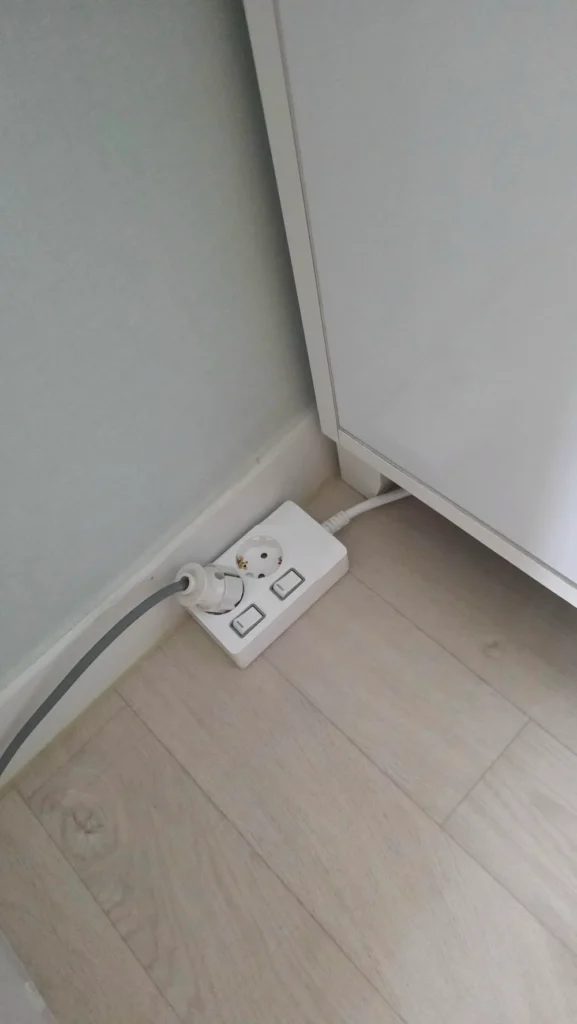
멀티탭이 바닥에 놓이는 자리는 대부분 애매합니다. 벽 콘센트는 가구 뒤에 숨어 있고, 전선을 빼내려면 가구 틈을 지나야 하고, 본체는 손이 닿는 곳과 안 보이는 곳 사이 어딘가에 놓입니다. 이때 전선 길이가 맞지 않으면 멀티탭 본체가 계속 당겨집니다. 플러그가 단단히 꽂혀 있어도 전선이 한쪽으로 힘을 받으면 연결부가 편하지 않습니다.
가구 옆이나 침대 아래, 책상 다리 근처에서는 멀티탭이 쉽게 비스듬해집니다. 플러그가 아래로 눌리거나, 전선이 꺾이거나, 본체가 바닥에서 살짝 떠 있는 상태로 쓰이는 경우도 있습니다. 이런 배치는 처음에는 대충 넘어가지만, 시간이 지나면 청소하기도 불편하고 먼지도 쌓이기 쉽습니다. 가전 문제가 생긴 것처럼 느껴지는 순간에도 사실은 연결 환경이 먼저 흐트러져 있을 수 있습니다.
전선 길이는 짧아도 불편하고 길어도 관리가 필요합니다. 3m 제품은 책상, 침실, 거실에서 가장 많이 쓰기 쉬운 길이이고, 더 먼 위치에서는 5m가 필요할 수 있습니다. 다만 남는 전선을 세게 묶어두거나 가구 밑에 눌러두면 사용감이 떨어집니다. 멀티탭은 제품 자체만큼이나 놓는 자리와 전선 흐름이 중요합니다.
고전력 가전은 다른 기준으로 연결해야 합니다
멀티탭 연결 이야기를 할 때 에어컨, 건조기, 인덕션, 전기히터 같은 제품은 따로 생각해야 합니다. 이런 가전은 전기 에너지를 열이나 강한 출력으로 바꾸는 시간이 길고, 소비전력도 큽니다. 일반 충전기나 조명처럼 가볍게 꽂아두는 제품과 같은 기준으로 묶기 어렵습니다.
고용량 가전 주변에서는 제품 설명서의 권장 연결 방식, 벽 콘센트 상태, 차단기 구성, 사용 전력, 전선 위치까지 함께 놓고 판단하는 게 맞습니다. 써보니 제품에서도 4구 이상 라인에서는 별도 과부하차단 스위치 구성을 볼 수 있고, 누전차단기는 일반 개별스위치 라인이 아니라 고용량 라인에서 확인하는 기능입니다. 과부하차단과 누전차단은 역할이 다르기 때문에 이름만 비슷하게 보고 넘기면 헷갈리기 쉽습니다.
가전이 비싸질수록 전원 연결도 같이 신경 쓰게 됩니다. TV, 컴퓨터, 공기청정기처럼 오래 켜두는 제품은 안정적인 접지 멀티탭과 정리된 전선 배치가 필요하고, 건조기나 인덕션처럼 전력 사용량이 큰 제품은 고용량 기준을 별도로 확인해야 합니다. 가전만 좋은 제품으로 바꿔도 전원 연결이 불안하면 사용감은 끝까지 깔끔해지지 않습니다.
멀티탭 연결을 다시 잡는 작은 기준
가전이 말썽을 부리는 것처럼 느껴질 때, 기기부터 바꾸기 전에 멀티탭 주변을 한 번 보는 것만으로도 흐름이 달라집니다. 플러그가 비스듬히 들어가 있지는 않은지, 어댑터가 옆 플러그를 누르고 있지는 않은지, 전선이 가구 밑에서 꺾여 있지는 않은지, 먼지가 쌓인 곳에 그대로 놓여 있지는 않은지 확인해볼 만합니다.
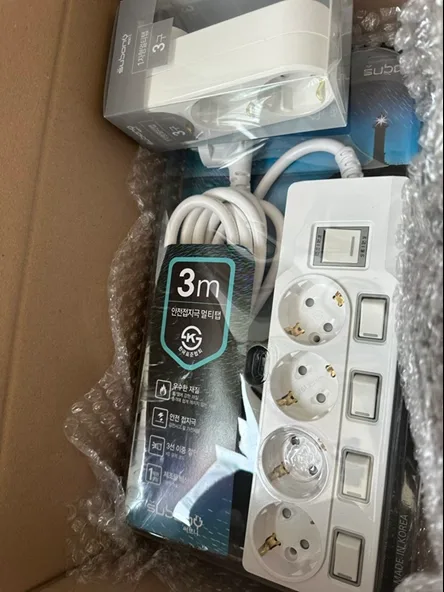
좋은 멀티탭은 화려한 기능보다 기본적인 연결감을 먼저 보여줍니다. 플러그가 단단하게 꽂히고, 접지 단자가 보이고, 스위치가 흔들림 없이 눌리고, 본체 마감이 깔끔하면 오래 쓰는 자리에서도 덜 신경 쓰입니다. 써보니 멀티탭은 이런 기본 기준을 바탕으로 책상, 거실, 침실, 주방 보조 공간까지 나누어 선택하기 좋은 제품군을 갖추고 있습니다.
전자제품이 많아질수록 전원 연결은 더 복잡해집니다. 그래서 멀티탭은 마지막에 아무거나 고르는 부품이 아니라, 가전과 벽 콘센트 사이에서 실제로 전원을 맡는 제품으로 봐야 합니다. 연결이 흔들리지 않는 멀티탭을 고르고, 설치 위치를 제대로 잡는 것만으로도 집 안 전원 환경은 훨씬 차분해집니다.
써보니 멀티탭 3D로 비교하기
크게 보기 ↗When the appliance is not the real problem
When a TV flickers for a moment, a charger takes longer than usual to respond, or a router seems to lose power briefly, most people suspect the appliance first. The device feels old, the adapter looks tired, or the charger seems unreliable. That reaction is natural, but in many homes the first thing worth checking is the power connection itself. A plug that does not sit firmly, a power strip body that is pulled at an angle, or a heavy adapter pressing down on one socket can make the whole setup feel less stable.
A power strip is often treated as a simple extension. In real use, it becomes the final point where electricity meets everyday appliances. The wall outlet may be fine, and the appliance may be fine, but the connection between them can still be messy. This is especially common behind TV cabinets, under desks, beside beds, and near charging areas where several plugs and adapters gather in a small space. A good power strip does not magically solve every electrical condition, but it helps reduce small connection problems that users notice in daily life.
Subony power strips are designed for these ordinary spaces where practical details matter. Plug fit, grounded socket structure, switch feel, cable length, body finish, and installation position all belong to the same story. If the connection feels unstable, the user keeps checking the plug again and again. If the connection feels steady, the power strip quietly disappears into the background, which is exactly what a daily electrical product should do.
Loose plug fit can feel like an appliance issue
The first impression of a power strip often comes from how the plug goes in. Some sockets feel loose from the start. The plug enters too easily, moves when the cable is touched, and makes the user wonder whether it is fully connected. Other products hold the plug with a firmer, more settled feel. This does not mean the plug should be forced. It simply means the socket and plug meet with less movement and less uncertainty.
Loose plug fit is not only annoying. It changes the way people use the connected appliance. A person may push the plug in again, rotate the adapter, avoid touching the cable, or keep checking whether the device is still powered. Around notebooks, monitors, routers, TV accessories, and chargers, that repeated checking becomes part of the user experience. Before blaming the appliance, it is worth looking at the power entry point.
For this reason, a grounded power strip with stable socket structure and a well-finished body can make everyday use feel calmer. Subony products show their grounding terminals, switch layout, cable length, and rated specification clearly, so buyers can judge the product before installation. The difference is not only visual. It appears when a plug is inserted, when a switch is pressed, and when the power strip stays in place after several devices are connected.
Adapters make the power area more complicated
Modern homes are full of adapters. A TV area may include a set-top box, a router, a speaker, a game console, and several charging cables. A desk may include a monitor, a notebook adapter, a lamp, a phone charger, and small accessories. These adapters rarely line up neatly. Some are wide enough to block the next socket. Some are heavy enough to tilt. Some pull their cable in the opposite direction of the power strip body.
When several adapters gather in one place, the power strip has to handle more than simple outlet expansion. Socket spacing, plug direction, switch placement, and body stability all become practical details. If the product is too light or the plugs are too close together, the connected area quickly becomes crowded. If the power strip sits at an angle or the cable is pulled under furniture, the connection feels messy even if everything is technically powered on.
An individual switch power strip can help organize this kind of space. Devices that are not used all day can be switched off separately, while routers or essential devices remain connected. Still, the number of switches is not the only point. The real setup should consider where each adapter sits, how the cable travels, and whether the body can stay flat without being pulled by one heavy plug.
Grounding, switches, and cable position work together
The metal grounding terminals inside the socket area are easy to overlook, but they are part of the basic structure many users expect from a safer household power strip. The power strip itself and the wall outlet environment should be considered together. A power strip alone cannot change the entire electrical condition of a room, but clear grounding structure is still an important buying point.
Switch feel also matters because it is one of the few parts users touch every day. If the switch feels loose, rattles too much, or seems poorly aligned, the product feels less dependable. A clean switch action and a tidy body finish are not luxury details. They are part of the everyday contact between the user and the electrical product.
Cable position completes the setup. If the cable is too short, the power strip body may be pulled toward the wall outlet. If the cable is too long and tied tightly behind furniture, dust and pressure become new problems. The better question is not simply whether a longer cable is better. The better question is where the product will sit, what appliances will be connected, and how the cable will travel without being bent or squeezed.
High-power appliances need a separate decision
Connection quality is important, but it should not be confused with high-power appliance selection. Air conditioners, dryers, induction cooktops, electric heaters, and similar appliances use much more power than ordinary chargers or lamps. They often convert electrical energy into heat or strong output for a long period of time. For those products, the appliance manual, wall outlet condition, breaker structure, rated power, and cable path should all be checked before choosing a power strip.
In the Subony lineup, separate overload protection switches can be found in lines with four or more outlets, while leakage breaker functions belong to high-capacity lines rather than general individual switch models. Overload protection and leakage protection are not the same feature. A user shopping for a high capacity power strip should check the actual breaker structure instead of relying only on a product name.
For desks, bedrooms, and TV areas, plug fit, grounding, switch feel, socket spacing, and cable length may be the main concerns. For laundry rooms, kitchens, and summer air conditioner areas, the standard becomes stricter. A dryer or induction cooktop is not an ordinary charger. A power strip used around those appliances should be selected with the appliance and the electrical environment in mind.
Subony and the quiet basics of a stable power setup
A good power strip does not need to look dramatic. It should hold plugs steadily, show clear rating information, provide a grounded structure, sit well in the intended space, and offer a product line that matches different rooms. Subony products are built around the 16A 250V standard, with options for two-outlet, three-outlet, individual switch, USB, and high-capacity use cases. That makes it easier to select the right product for the right location instead of using one type everywhere.
When a home has more electronics, the power setup becomes more important. A premium TV, computer, air purifier, router, or charger still depends on the connection that powers it. If the plug is loose or the cable is pulled at an awkward angle, the expensive appliance does not feel fully settled. This is why a power strip should not be the last item chosen in a hurry.
Before replacing an appliance or blaming a charger, it is worth checking the power strip area. Look at the plug fit, adapter spacing, cable direction, switch condition, dust around the sockets, and the position of the body on the floor. Those small checks make the difference between a cluttered power corner and a calmer, more reliable electrical setup.
추가 정보
멀티탭 연결이 불안하면 가전 문제처럼 느껴질 수 있습니다. 플러그 체결감, 접지 단자, 어댑터 간섭, 스위치 눌림, 전선 배치를 함께 확인하면 전원 환경을 더 현실적으로 판단할 수 있습니다.
써보니 멀티탭은 16A 250V 기준, 국내 생산 라인, KS 인증 제품군, 1년 무상 AS를 함께 비교할 수 있습니다. 책상, 거실, 침실, 주방 보조 공간처럼 실제 놓이는 위치에 따라 선택 기준이 달라집니다.
고전력 가전 주변은 일반 충전기나 조명과 따로 봐야 합니다. 에어컨, 건조기, 인덕션처럼 소비전력이 큰 제품은 제품 설명서, 벽 콘센트 상태, 차단기 구성, 고용량 라인 여부를 함께 확인하는 흐름이 맞습니다.
멀티탭 연결 점검 기준
- 플러그가 헐겁게 흔들리지 않고 끝까지 안정적으로 꽂히는지 확인합니다.
- 무거운 어댑터가 옆 플러그를 누르거나 콘센트를 가리지 않는지 봅니다.
- 접지 단자와 벽 콘센트 접지 환경을 함께 살핍니다.
- 개별스위치가 덜컥거리지 않고 필요한 기기만 나눠 끌 수 있는지 봅니다.
- 전선이 가구 밑에서 꺾이거나 본체를 당기고 있지 않은지 확인합니다.
- TV장 뒤, 책상 아래, 침대 옆처럼 먼지가 쌓이기 쉬운 자리를 정리합니다.
- 고전력 가전 주변은 일반 멀티탭과 고용량 라인을 나누어 생각합니다.
- 제품 정격, 인증 표기, 제조 정보, AS 기준이 분명한 브랜드인지 봅니다.
써보니 제품 라인에서 달라지는 포인트
써보니 전 제품은 16A 250V 기준으로 구성되어 있습니다. 2구, 3구, 개별스위치, USB, 고용량 라인처럼 사용 위치와 연결할 기기에 따라 제품군이 나뉩니다.
4구 이상 라인에서는 별도 과부하차단 스위치 구성을 볼 수 있고, 누전차단기는 일반 개별스위치 라인이 아니라 고용량 라인에서 확인하는 기능입니다. 과부하차단과 누전차단은 같은 기능이 아니므로 구분해서 읽어야 합니다.
구매 전에 많이 묻는 질문
멀티탭 연결이 불안하면 어떤 증상이 생기나요?
플러그가 조금 흔들려도 계속 써도 되나요?
어댑터가 큰 제품은 어떤 멀티탭이 맞나요?
개별스위치 멀티탭은 왜 편한가요?
접지 멀티탭이면 전부 같은 기준으로 보면 되나요?
고용량 가전도 일반 멀티탭에 연결해도 되나요?
써보니 멀티탭은 어떤 기준으로 고르면 되나요?
멀티탭도 가전 보호와 관련이 있나요?
공간별 연결 기준
책상과 홈오피스
노트북 어댑터, 모니터, 충전기, 조명이 함께 모입니다. 플러그 간격, 스위치 위치, 전선 방향이 사용감에 크게 남습니다.
거실과 TV장
TV, 셋톱박스, 공유기, 콘솔처럼 상시 연결되는 제품이 많습니다. 먼지와 어댑터 간섭, 본체 위치를 함께 정리해야 합니다.
침실과 충전 공간
손이 자주 닿는 자리라 스위치 눌림과 플러그 체결감이 중요합니다. 협탁 주변에서는 전선 길이와 본체 노출도 함께 봅니다.
주방과 다용도실
전기포트, 에어프라이어, 건조기처럼 소비전력이 큰 제품이 들어올 수 있습니다. 일반 멀티탭과 고용량 라인을 나누어 생각합니다.
관련 페이지와 구매 동선
써보니 브랜드 기준은 IWID 써보니 브랜드 페이지에서 확인할 수 있습니다. 제품 구성과 구매는 써보니몰과 써보니 스마트스토어에서 비교할 수 있습니다.