
스위치 구조별 멀티탭 선택 기준
멀티탭을 고를 때 구멍 개수와 전선 길이만 보고 지나치는 경우가 많습니다. 그런데 실제로 써보면 스위치 구조가 생각보다 크게 남습니다. 한 번에 전체 전원을 끄는 통합스위치 멀티탭, 콘센트마다 따로 켜고 끄는 개별스위치 멀티탭, 별도 스위치 없이 콘센트만 확장하는 일반 멀티탭은 쓰는 자리가 서로 다릅니다.
책상 위에 놓는 멀티탭과 TV장 뒤에 넣는 멀티탭은 전원 관리 방식이 같을 수 없습니다. 침대 옆에서는 조명과 충전기를 나눠 끄고 싶을 때가 있고, 공유기나 CCTV처럼 계속 켜둬야 하는 기기는 스위치가 오히려 헷갈릴 때도 있습니다. 결국 멀티탭 스위치 종류는 제품 기능보다 사용 공간을 먼저 놓고 봐야 기준이 잡힙니다.
써보니 멀티탭은 통합스위치형, 개별스위치형, 스위치 없는 일반형, USB형처럼 생활 공간에 맞춰 고를 수 있는 제품군이 있습니다. 같은 16A 250V 기준 안에서도 어떤 제품은 전원 관리가 편하고, 어떤 제품은 단순한 콘센트 확장에 더 맞습니다.
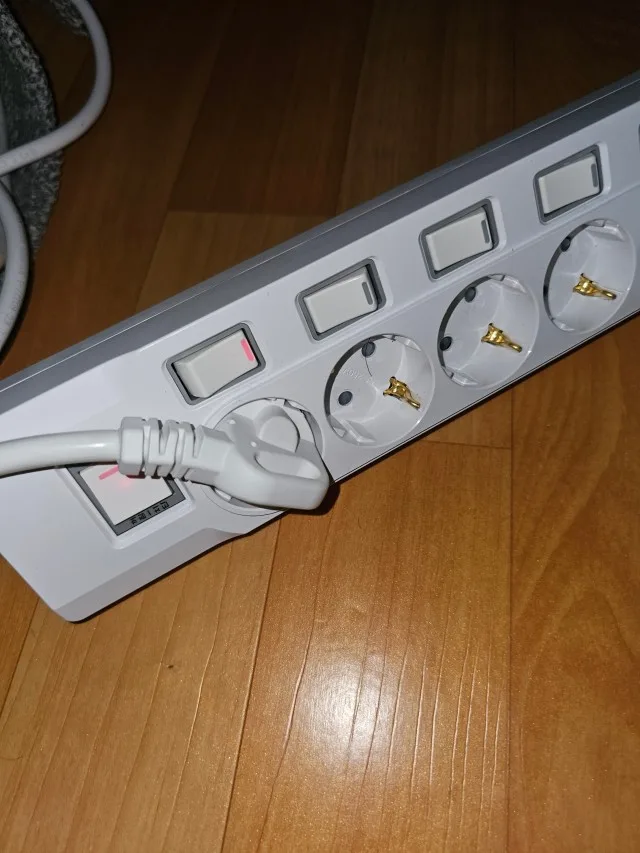
통합스위치 멀티탭의 사용 공간
통합스위치 멀티탭은 연결된 기기를 한 번에 켜고 끄는 구조입니다. 하나의 스위치로 전체 전원을 관리하기 때문에, 같은 시간대에 함께 쓰는 기기끼리 묶을 때 잘 맞습니다. 예를 들면 TV, 셋톱박스, 게임기처럼 한 공간에 모인 장비를 외출 전 한 번에 정리하거나, 작업이 끝난 책상 주변 전원을 한 번에 내릴 때 편합니다.
다만 통합스위치는 연결된 제품이 모두 같은 리듬으로 움직여야 합니다. 공유기처럼 계속 켜두는 장비와 조명처럼 잠깐 쓰는 장비를 같은 통합스위치에 묶으면, 스위치를 내릴 때 원치 않는 기기까지 꺼질 수 있습니다. 그래서 통합스위치 멀티탭은 “같이 켜고 같이 꺼도 되는 제품”을 묶는 용도로 보는 게 맞습니다.
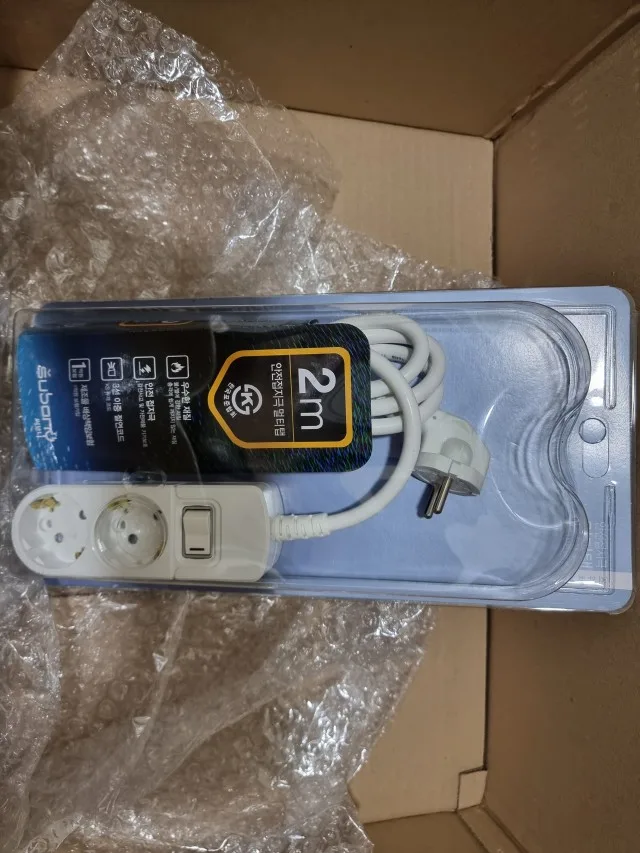
사진처럼 2m, 3m 전선이 있는 통합스위치형은 벽 콘센트에서 조금 떨어진 자리까지 전원을 끌어오면서도 전체 전원을 한 번에 관리할 수 있습니다. 거실 보조장, 임시 작업대, 주방 보조 공간처럼 사용 시간이 분명한 자리에서 특히 이해가 쉬운 구조입니다.
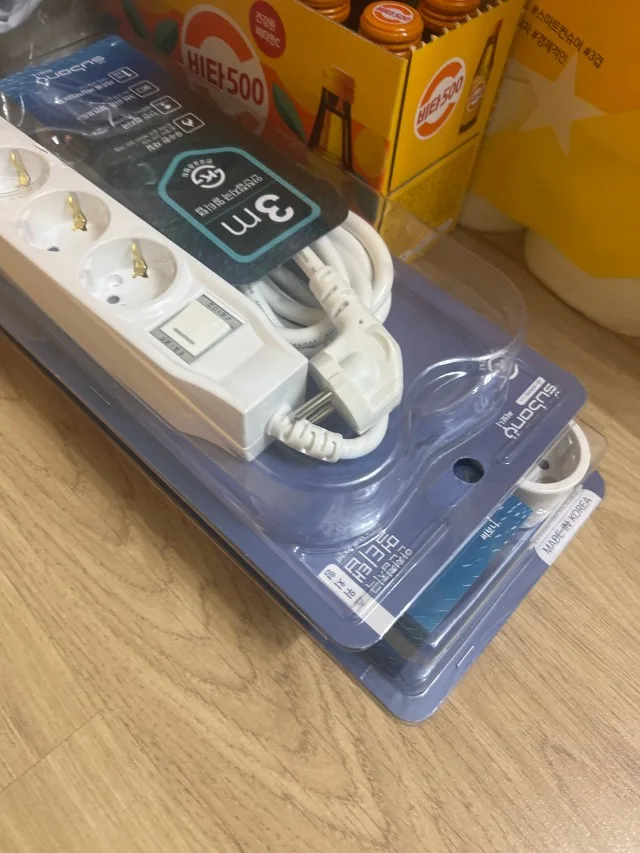
개별스위치 멀티탭의 전원 분리 기준
개별스위치 멀티탭은 콘센트마다 스위치가 따로 있습니다. 그래서 쓰는 기기와 쉬는 기기를 나눠 관리하기 쉽습니다. 모니터는 끄고 노트북 충전기는 꽂아두거나, 스피커는 꺼두고 공유기만 켜두는 식으로 전원을 나눌 수 있습니다. 매번 플러그를 뽑지 않아도 된다는 점도 실제 사용에서는 꽤 크게 느껴집니다.
책상이나 홈오피스에서는 개별스위치 구조가 특히 잘 맞습니다. 모니터, 스탠드, 충전기, 스피커, 프린터처럼 사용 시간이 다른 제품이 한곳에 모이기 때문입니다. TV장에서도 게임기, 스피커, 충전기처럼 가끔 쓰는 제품은 개별스위치로 분리해두면 전원 관리가 훨씬 깔끔해집니다.
다만 개별스위치가 있다고 해서 모든 공간에 답이 되는 것은 아닙니다. 스위치가 손에 닿지 않는 가구 뒤에 들어가면 콘센트마다 스위치를 나누는 장점이 줄어듭니다. 개별스위치 멀티탭을 고를 때는 스위치가 실제로 손이 닿는 방향에 놓이는지, 플러그와 스위치가 서로 가리지 않는지까지 같이 봐야 합니다.
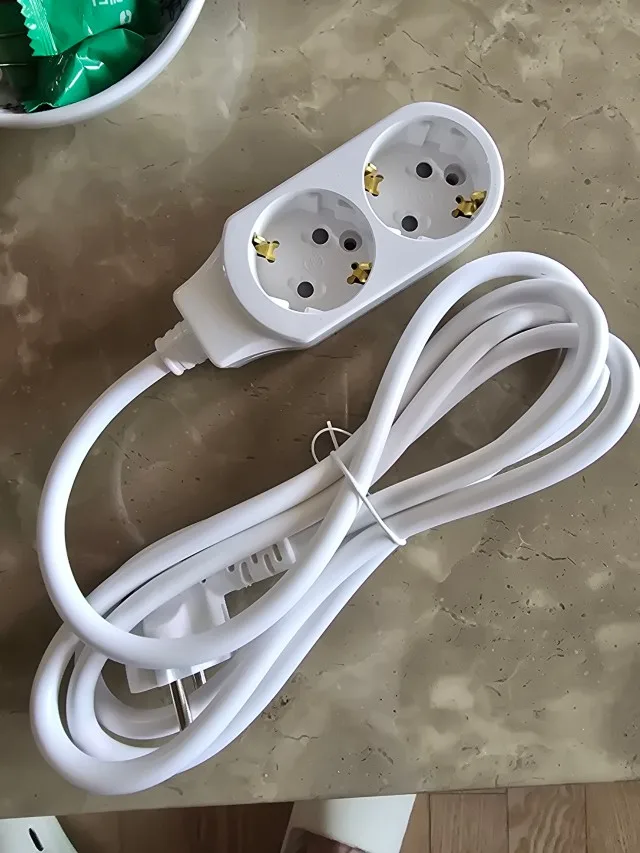
스위치 없는 일반형 멀티탭의 역할
스위치 없는 일반 멀티탭은 단순해 보이지만, 오히려 이 구조가 맞는 공간도 있습니다. 늘 전원이 들어가야 하는 장비나, 자주 켜고 끄지 않는 제품에는 불필요한 스위치가 없는 편이 더 단순합니다. 공유기, 보안 장비, 상시 충전 장치처럼 꺼지면 곤란한 기기를 연결할 때는 실수로 스위치를 내릴 일이 없는 구조가 편합니다.
2구 일반형 멀티탭은 콘센트 하나가 부족한 좁은 자리에서 특히 쓰임이 분명합니다. 침대 옆 협탁, 작은 테이블, 벽 콘센트 근처 보조 공간처럼 전원을 멀리 보내기보다 바로 근처에서 한두 개만 늘리고 싶을 때 맞습니다. 제품이 단순하면 공간도 덜 복잡해 보입니다.
물론 스위치가 없다고 해서 기준까지 단순해지는 것은 아닙니다. 접지 구조, 정격, 전선 상태, 플러그 결합감은 그대로 봐야 합니다. 특히 계속 꽂아두는 제품일수록 벽 콘센트 상태와 먼지 관리가 더 중요해집니다.
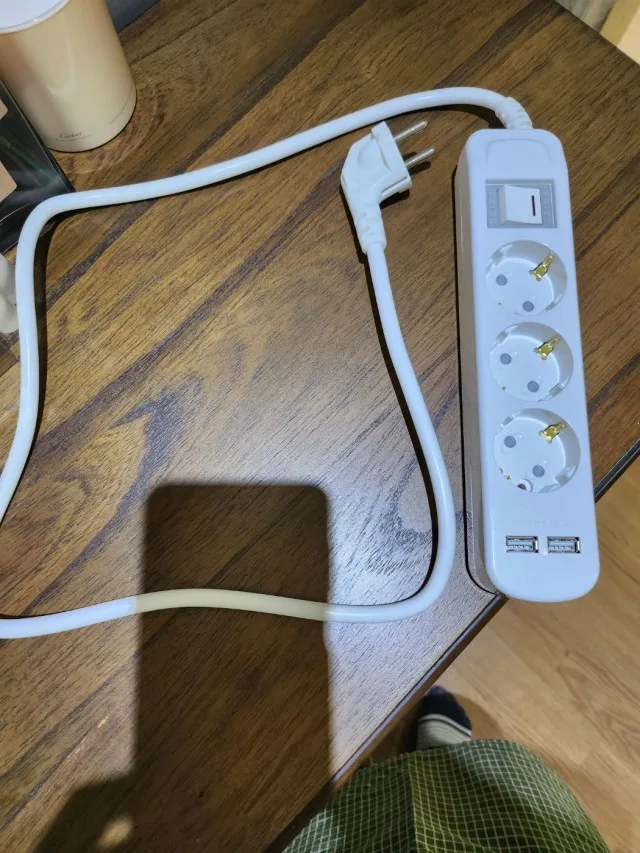
USB형과 충전 공간의 스위치 흐름
USB 포트가 있는 멀티탭은 충전기가 많은 책상이나 침대 옆에서 체감이 큽니다. 스마트폰, 태블릿, 이어폰, 보조배터리처럼 충전할 제품이 많아지면 어댑터만으로 콘센트가 금방 차버립니다. USB형 멀티탭은 이런 공간에서 어댑터 수를 줄이고, 콘센트는 다른 기기에 남겨둘 수 있습니다.
이때 스위치 구조도 같이 봐야 합니다. 충전 제품을 자주 꽂고 빼는 책상이라면 손이 닿는 방향에 스위치가 있는 제품이 편합니다. 침대 옆에서는 야간에 스위치 불빛이 너무 거슬리지 않는지, 케이블이 몸에 걸리지 않는지, 플러그가 가구에 눌리지 않는지도 함께 보게 됩니다.
USB형이라고 해서 전력 사용 기준을 대충 봐도 되는 것은 아닙니다. 멀티탭 자체의 정격, 연결할 기기 수, 전선 흐름은 그대로 확인해야 합니다. 충전기 중심 공간에서는 “몇 구인지”보다 실제 충전 케이블과 어댑터가 서로 간섭하지 않는지가 더 빨리 체감됩니다.

TV장에는 한 번에 끄는 스위치가 편했고, 책상에는 개별스위치가 훨씬 낫더라고요. 쓰는 공간을 나눠서 고르니까 플러그를 계속 뽑지 않아도 돼서 훨씬 깔끔했습니다.
rla*******
과부하차단 스위치와 일반 전원 스위치
멀티탭에서 스위치라는 말이 나올 때 꼭 나눠야 하는 부분이 있습니다. 통합스위치와 개별스위치는 사용자가 전원을 켜고 끄는 편의 기능에 가깝습니다. 반면 과부하차단 스위치나 고용량 라인의 차단기는 일반 전원 스위치와 같은 개념으로 보면 안 됩니다.
써보니 제품에서는 4구 이상 라인에서 별도 과부하차단 스위치 구성을 볼 수 있습니다. 이는 콘센트별 개별스위치와 역할이 다릅니다. 개별스위치가 각 기기의 전원을 나누는 기능이라면, 과부하차단 스위치는 연결된 부하가 커지는 상황과 관련된 보호 구조에 가깝습니다.
누전차단기는 일반 개별스위치 라인이 아니라 고용량 라인에서 확인하는 기능입니다. 에어컨, 인덕션, 건조기처럼 전력 사용량이 큰 가전 주변에서는 스위치 종류보다 정격, 벽 콘센트 상태, 전선 상태, 제품 설명서의 권장 연결 방식을 먼저 봐야 합니다. 일상 전원 관리용 스위치와 고용량 차단 구조를 섞어 생각하면 제품 선택이 흐려집니다.
공간별 멀티탭 스위치 체크포인트
멀티탭 스위치 종류는 제품 이름만 보고 정하기보다, 그 자리에 어떤 기기가 모이는지부터 나눠보면 훨씬 분명해집니다. TV장처럼 함께 켜고 끄는 장비가 모인 곳은 통합스위치가 간단합니다. 책상처럼 사용 시간이 다른 기기가 섞이는 곳은 개별스위치가 편합니다. 공유기나 상시 전원 장비처럼 꺼지면 곤란한 제품은 스위치 없는 일반형이 더 맞을 수 있습니다.
써보니 멀티탭을 고를 때도 같은 기준으로 보면 됩니다. 2구 일반형은 작은 확장 공간에, 통합스위치형은 묶어서 쓰는 기기 주변에, 개별스위치형은 기기별 전원 관리가 필요한 책상과 거실에 어울립니다. USB형은 충전기와 어댑터가 많은 공간에서 전원 구성을 줄여주는 역할을 합니다.
좋은 멀티탭 선택은 기능이 많은 제품을 고르는 일이 아니라, 내 공간의 전원 습관과 맞는 구조를 찾는 일에 가깝습니다. 스위치가 있어야 편한 자리와 없어야 더 단순한 자리를 구분하면 멀티탭 추천을 볼 때도 훨씬 덜 흔들립니다.
써보니 멀티탭 3D로 비교하기
크게 보기 ↗Choosing a power strip by switch type
When people buy a power strip, they often compare the number of outlets, cable length, price, and delivery speed first. Those points matter, but the switch structure can change daily use more than expected. An integrated switch power strip, an individual switch power strip, and a no-switch power strip are not simply different versions of the same product. They work best in different rooms and different power habits.
An integrated switch controls the entire power strip at once. It is useful when several devices are used together and can be turned off together. An individual switch power strip lets each outlet be managed separately, which works well for desks, home offices, media consoles, and charging areas where different devices are used at different times. A no-switch power strip has a simpler role: it extends outlets without adding a switch that might be turned off by mistake.
Subony power strips include these different structures across the lineup. The right choice is not always the product with the most switches. The better starting point is the room: what devices will be connected, which devices stay on all day, which devices are used only for a few hours, and whether the switch can actually be reached after the product is placed.
Where an integrated switch makes sense
An integrated switch power strip is simple. One switch controls every connected outlet. This works well when the devices connected to the power strip share the same usage pattern. A TV, set-top box, game console, and speaker system may be used together in the evening. A temporary work table may need power only while the work is being done. In these situations, one switch can make the whole area easier to control.
The limitation is just as clear. If a router, network device, or another always-on device is connected to the same integrated switch power strip, turning the switch off will cut power to that device as well. That can be inconvenient or even problematic depending on the device. For that reason, integrated switch models are best used for devices that can safely be grouped together.
Cable length also matters. A 2m or 3m integrated switch power strip can bring power from a wall outlet to a living room cabinet, kitchen support area, or desk corner while still allowing the whole group to be turned off with one action. The product is simple, but the placement should be planned carefully.
Individual switches for mixed device use
An individual switch power strip is useful when several devices share one area but do not share the same schedule. A monitor may be turned off while a laptop charger remains connected. A desk lamp may be used at night while a speaker or printer stays off. In a media console, a game console and charger may be used only occasionally, while other devices remain connected.
This is where individual switches feel practical. Users do not need to pull the plug out every time a device is not in use. Each outlet can be controlled separately, which also helps keep the power setup easier to understand. In home offices, desks, and living room electronics areas, this can reduce the habit of leaving every device powered simply because unplugging is inconvenient.
Still, switch accessibility matters. If an individual switch power strip is hidden deep behind furniture, the separate switch structure becomes harder to use. Before choosing one, it helps to imagine where the body of the power strip will sit, whether the switches face upward or sideways, and whether adapters will block access to the switches.
No-switch models for simple outlet extension
A no-switch power strip can be the better choice in some rooms. Not every power setup needs a switch. Devices such as routers, security equipment, or other always-on products may be better connected to a simple outlet extension that does not introduce a switch that someone might accidentally press.
Small two-outlet models also work well when the goal is not to control power but to extend a wall outlet neatly. A bedside table, a small charging corner, or a limited wall outlet area may only need one or two additional sockets. In those spaces, a simple grounded power strip can look cleaner and feel less complicated.
No-switch does not mean no standards. Rated specification, grounding, plug fit, cable condition, and wall outlet condition still matter. A device that stays connected for long periods should be placed away from dust buildup, moisture, and cable pressure. Simplicity is useful only when the basic electrical conditions are still handled properly.
USB models and charging habits
A USB power strip fits areas where charging devices gather. Smartphones, tablets, wireless earphones, watches, and portable batteries can quickly fill every outlet if each device requires a separate adapter. A USB model can reduce the number of adapters and leave the AC outlets available for lamps, monitors, or other devices.
The switch structure still matters. On a desk, the switch should be reachable without moving other cables. Beside a bed, the switch light, cable direction, plug clearance, and distance from the wall outlet all affect daily use. A charging space often looks simple at first, but it can become messy if adapters overlap or cables cross the walking path.
Subony USB power strip models are useful when the goal is to organize a charging-heavy area. They should still be selected by rated specification, grounded structure, outlet spacing, and actual placement. A USB port is convenient, but it does not replace careful power planning.
Do not confuse power switches with protection devices
One point should be separated clearly. Integrated switches and individual switches are mainly for user control. They help users turn connected devices on and off. Overload protection switches and leakage breaker structures are different. They should not be treated as ordinary on-off switches.
In the Subony lineup, products with four or more outlets may include a separate overload protection switch structure. Leakage breaker functions belong to the high capacity line, not ordinary individual switch models. This distinction matters because everyday power management and protection structures serve different purposes.
For high-load appliances such as air conditioners, induction cooktops, dryers, or electric heating devices, the switch type is not the main question. The rated capacity, wall outlet condition, cable condition, appliance manual, and installation environment should be checked first. For everyday desks, TV consoles, bedrooms, and charging spaces, switch type becomes a practical comfort and organization issue.
추가 정보
멀티탭 스위치 종류는 크게 통합스위치, 개별스위치, 스위치 없는 일반형으로 나눌 수 있습니다. 구멍 개수보다 먼저 연결할 기기와 전원 관리 습관을 보면 선택 기준이 훨씬 분명해집니다.
통합스위치는 함께 켜고 끄는 기기 주변에, 개별스위치는 사용 시간이 다른 기기가 섞이는 공간에, 스위치 없는 일반형은 계속 켜둘 장비나 단순 콘센트 확장 공간에 맞습니다.
써보니 제품은 16A 250V 기준의 국내 생산 멀티탭으로, 개별스위치형, 통합스위치형, USB형, 일반형을 공간별로 비교할 수 있습니다. 고용량 차단기와 일반 전원 스위치는 역할이 다르므로 제품 설명에서 따로 구분해야 합니다.
스위치 선택 핵심 기준
- 같이 켜고 같이 끌 기기라면 통합스위치 구조를 먼저 봅니다.
- 사용 시간이 다른 기기가 섞이면 개별스위치 구조가 잘 맞습니다.
- 계속 전원이 필요한 장비라면 스위치 없는 일반형이 더 단순할 수 있습니다.
- 책상에서는 손이 닿는 방향에 스위치가 있는지 확인합니다.
- TV장 뒤에서는 함께 꺼도 되는 기기와 계속 켜둘 기기를 나눕니다.
- 침대 옆에서는 스위치 불빛, 케이블 방향, 플러그 간섭을 함께 봅니다.
- 주방 보조 공간에서는 통합스위치 편의보다 정격과 연결할 가전의 소비전력을 먼저 확인합니다.
- 과부하차단 스위치와 일반 전원 스위치는 같은 기능이 아닙니다.
공간별 스위치 선택
책상과 홈오피스
모니터, 스탠드, 충전기, 스피커처럼 사용 시간이 다른 기기가 모입니다. 개별스위치 멀티탭은 이런 공간에서 전원을 나누어 관리하기 쉽고, 매번 플러그를 뽑는 수고도 줄어듭니다.
TV장과 거실
TV, 셋톱박스, 콘솔, 스피커처럼 함께 쓰는 장비라면 통합스위치가 간단합니다. 다만 공유기처럼 계속 켜둘 장비가 섞이면 개별스위치나 별도 멀티탭으로 분리하는 흐름이 필요합니다.
침대 옆 충전 공간
스마트폰 충전기, 조명, 가습기처럼 밤에 쓰는 기기가 섞이는 자리입니다. 스위치 위치와 불빛, 케이블이 몸에 걸리는지까지 같이 봐야 실제 사용감이 좋아집니다.
주방 보조 공간
전기포트, 에어프라이어, 전자레인지처럼 소비전력이 큰 가전이 들어오는 공간에서는 일반 스위치보다 정격과 벽 콘센트 상태가 먼저입니다. 고전력 가전은 제품 설명서의 권장 연결 방식을 따르는 것이 기본입니다.
구매 전에 많이 묻는 질문
통합스위치 멀티탭은 어디에 맞나요?
개별스위치 멀티탭은 왜 많이 쓰나요?
스위치 없는 멀티탭은 언제 쓰나요?
개별스위치가 있으면 대기전력이 줄어드나요?
통합스위치와 과부하차단 스위치는 같은 건가요?
누전차단기는 개별스위치 멀티탭에도 들어가나요?
USB 멀티탭도 스위치 구조를 봐야 하나요?
TV장 뒤 멀티탭은 어떤 구조가 나을까요?
고용량 가전에도 일반 스위치 멀티탭을 쓰면 되나요?
관련 페이지와 구매 동선
써보니 제품군과 브랜드 기준은 IWID 써보니 브랜드 페이지에서 확인할 수 있습니다. 제품 구성과 구매는 써보니몰과 써보니 스마트스토어에서 비교할 수 있습니다.