
4구 멀티탭이 자주 선택되는 이유
멀티탭을 새로 고를 때는 구 수부터 망설이게 됩니다.
3구는 한두 개만 꽂아도 금방 자리가 없어지고, 6구는 TV장이나 책상 아래에 두면 생각보다 본체가 길게 느껴집니다.
모니터, 공유기, 스탠드, 충전기처럼 늘 꽂아 두는 기기가 있는 집에서는 4구가 가장 손에 잘 잡히는 구성입니다.
한 자리는 비워 두고 싶은데 3구는 부족하고, 그렇다고 6구까지는 필요하지 않은 자리도 많습니다.
거실 TV장 옆, 책상 밑, 침실 협탁 뒤처럼 전원을 네 개 안팎으로 쓰는 곳에서는 4구가 딱 맞습니다.
멀티탭이 너무 길게 남지 않으면서도 플러그를 억지로 빼고 끼울 일이 줄어듭니다.
써보니 4구 멀티탭은 각 콘센트의 개별스위치와 별도 과부하차단 스위치를 함께 갖춘 구성입니다.
개별스위치로는 필요한 자리만 따로 켜고 끌 수 있고, 과부하차단 스위치로는 멀티탭 전체 전원을 한 번에 켜고 끌 수 있습니다. 4구는 단순히 구멍이 네 개인 제품이 아니라, 집 안 전원을 나눠 쓰기에 가장 부담 없는 길이와 구성의 조합에 가깝습니다.
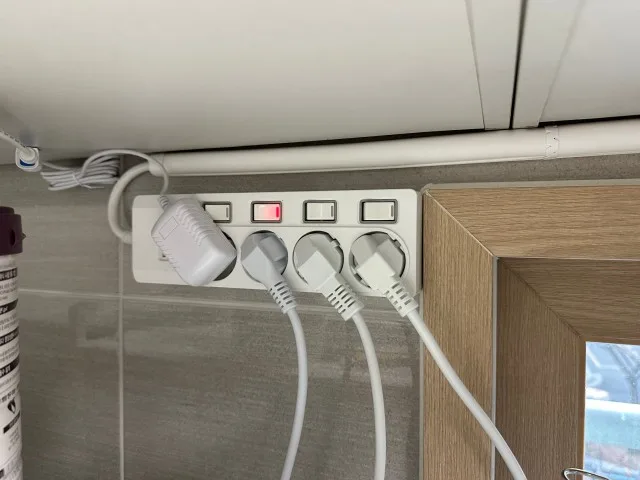
개별스위치와 과부하차단 스위치 구성
개별스위치는 꽂혀 있는 기기마다 전원을 따로 켜고 끄는 용도입니다.
밤에는 충전기를 끄고 싶거나, 평소 쓰지 않는 조명과 스피커만 꺼 두고 싶을 때 손이 갑니다.
스위치가 한 줄로 모여 있으면 어떤 기기가 켜져 있는지도 바로 보입니다.
4구 이상 써보니 라인에서 보이는 별도 과부하차단 스위치는 멀티탭 전체 전원을 한 번에 켜고 끄는 메인 스위치입니다.
여기에 과부하차단 장치가 함께 들어가 있어, 평소에는 전체 전원 스위치로 사용하고 전력 사용이 한쪽으로 몰리는 상황에서는 차단 구조가 작동합니다.
제품의 정격과 연결하는 가전의 소비전력은 여전히 먼저 확인해야 합니다.
과부하차단 기능이 있다고 해서 아무 가전이나 여러 개씩 꽂아도 되는 것은 아닙니다.
다만 TV장, 책상, 침실처럼 여러 소형 전자기기를 나눠 쓰는 공간에서는 개별스위치와 별도 차단 구조가 함께 있는 편이 훨씬 편합니다.
켜 둘 기기와 끌 기기가 구분되고, 멀티탭을 새로 살 때도 가격만 보지 않고 구조를 보게 됩니다.
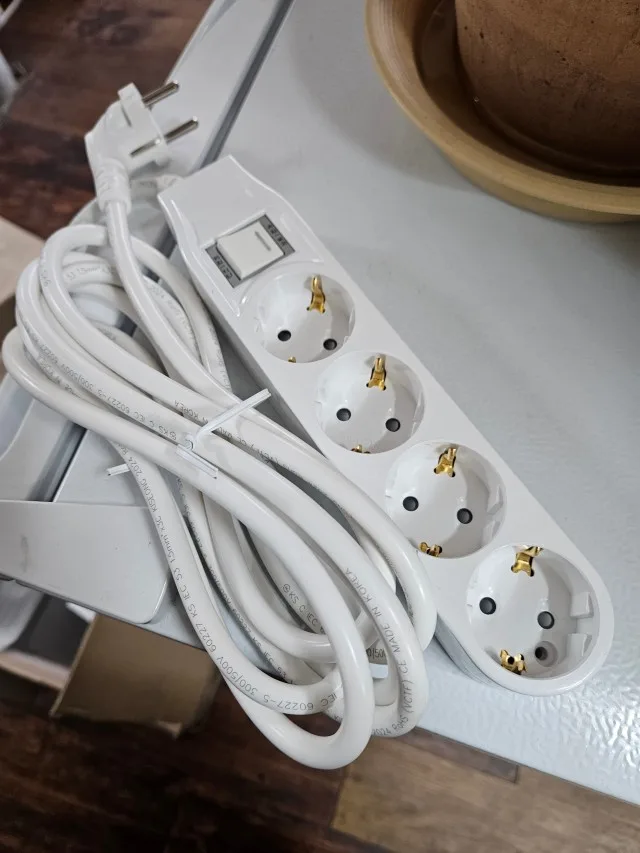
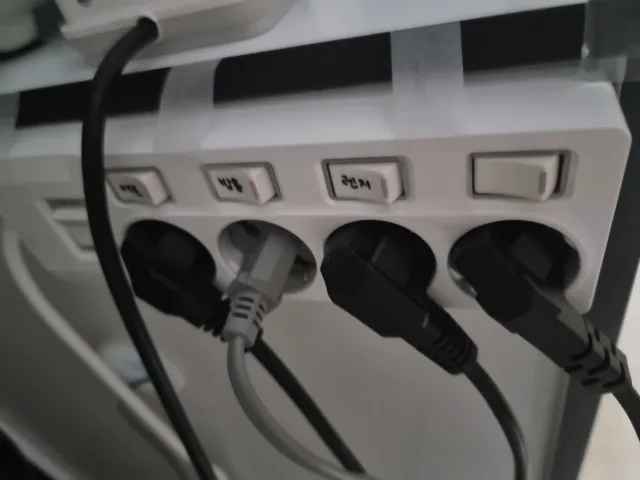
3구는 늘 하나가 아쉽고 6구는 너무 길어서 망설였는데, 4구로 바꾸니 TV장 뒤가 훨씬 정리됐어요. 개별스위치가 있어 안 쓰는 기기만 끄기 편합니다.
yhm*******
1m, 2m, 3m, 5m 전선 길이 선택
4구 멀티탭을 고를 때 구 수만큼 중요한 것이 전선 길이입니다.
벽 콘센트 바로 옆에 TV장이나 책상이 붙어 있다면 1m가 깔끔합니다.
남는 선을 말아 두지 않아도 되고, 가구 뒤쪽도 덜 복잡해집니다.
반대로 콘센트가 책상 옆이 아니라 반대편 벽에 있거나, 거실장 아래로 선을 빼야 한다면 짧은 선은 금방 불편해집니다.
2m는 책상과 벽 콘센트 사이에 약간의 거리가 있을 때 많이 쓰기 좋고, 3m는 TV장이나 소파 주변처럼 가구를 돌아가야 하는 자리에 잘 맞습니다.
5m는 콘센트 위치가 멀거나 선을 벽 쪽으로 빼서 동선을 비켜야 할 때 쓰게 됩니다.
길다고 무조건 편한 것은 아닙니다.
남는 선이 바닥에 뭉치면 청소할 때 걸리고, 가구를 옮길 때도 신경 쓰입니다.
가장 깔끔한 길이는 멀티탭을 둘 자리에서 벽 콘센트까지 재고, 여유를 조금만 더한 길이입니다.
책상 아래는 1m나 2m, 거실장은 2m나 3m, 방 끝이나 넓은 거실처럼 거리가 있는 자리는 5m를 먼저 떠올리면 선택이 빨라집니다.
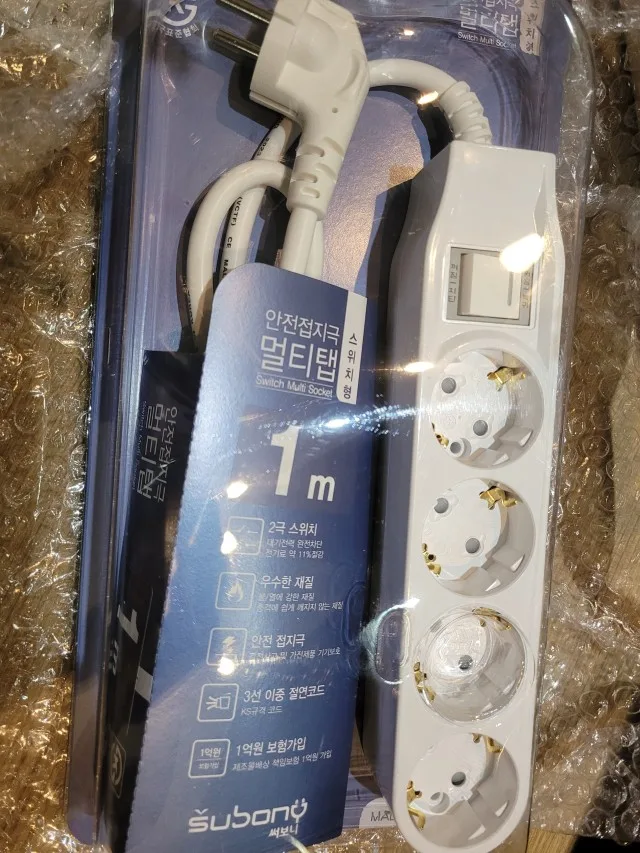
책상과 TV장에 맞는 4구 구성
책상 아래에는 모니터, 노트북 충전기, 스피커, 공유기처럼 계속 연결해 두는 기기가 모입니다.
이 네 가지가 한자리에 모이면 3구는 여유가 없습니다.
4구라면 자리를 하나씩 나눠 쓰면서, 잠깐 쓰는 충전기는 벽 콘센트나 다른 충전 공간으로 분리하기가 편합니다.
거실 TV장도 비슷합니다.
TV와 셋톱박스, 공유기, 사운드바처럼 계속 켜 두는 기기가 있으면 플러그 위치를 자주 바꾸지 않게 됩니다.
이때 본체가 너무 긴 6구보다 4구가 TV장 안이나 뒤쪽에 넣기 편한 경우가 많습니다.
개별스위치가 있으면 잠깐 쓰지 않는 기기를 따로 끌 수 있어, 어느 선이 어디로 가는지 파악하기도 쉽습니다.
플러그가 헐겁게 느껴지거나, 벽 콘센트가 변색되어 있거나, 전선 피복이 눌려 있다면 멀티탭만 바꾸고 끝낼 일이 아닙니다.
시작점인 벽 콘센트와 전선 상태를 함께 봐야 합니다.
4구 멀티탭은 자리가 남는다고 무조건 채우기보다, 연결하는 기기의 종류를 나눠 두는 방식이 더 오래 편합니다.
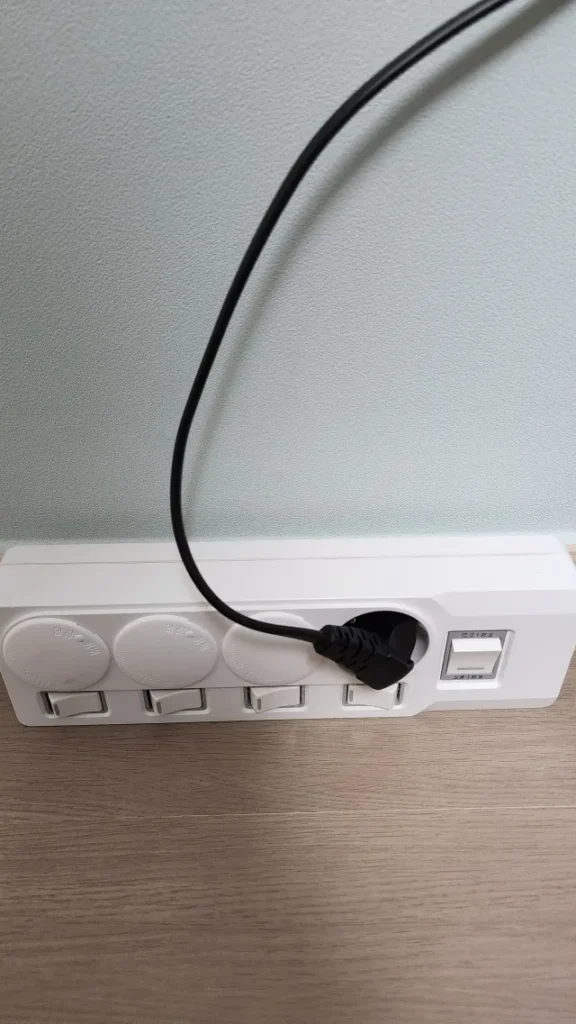
4구 멀티탭을 오래 쓰는 배치
4구 멀티탭은 어디에 두느냐에 따라 사용감이 크게 달라집니다.
책상 아래에 둘 때는 발에 차이지 않는 쪽으로 놓고, TV장 뒤에서는 플러그가 가구에 눌리지 않게 방향을 잡아야 합니다.
전선은 너무 팽팽하게 당기지 말고, 남는 부분만 느슨하게 정리하는 편이 낫습니다.
주방이나 다용도실처럼 열을 만드는 고전력 가전을 연결하는 자리는 일반적인 전원 정리 자리와 같은 기준으로 보면 안 됩니다.
그런 가전은 제품 설명서의 연결 방법과 정격을 먼저 따라야 합니다.
4구 과부하차단 멀티탭은 책상, TV장, 침실, 거실처럼 여러 소형 기기를 나눠 쓰는 자리에서 구성이 가장 잘 살아납니다.
1m, 2m, 3m, 5m 가운데 설치 위치에 맞는 길이를 고르고, 꼭 필요한 기기만 한 자리씩 나눠 연결하면 됩니다.
이 기본만 맞추면 4구 멀티탭은 시간이 지나도 자리가 모자라거나 본체가 지나치게 길어서 불편한 일이 적습니다.
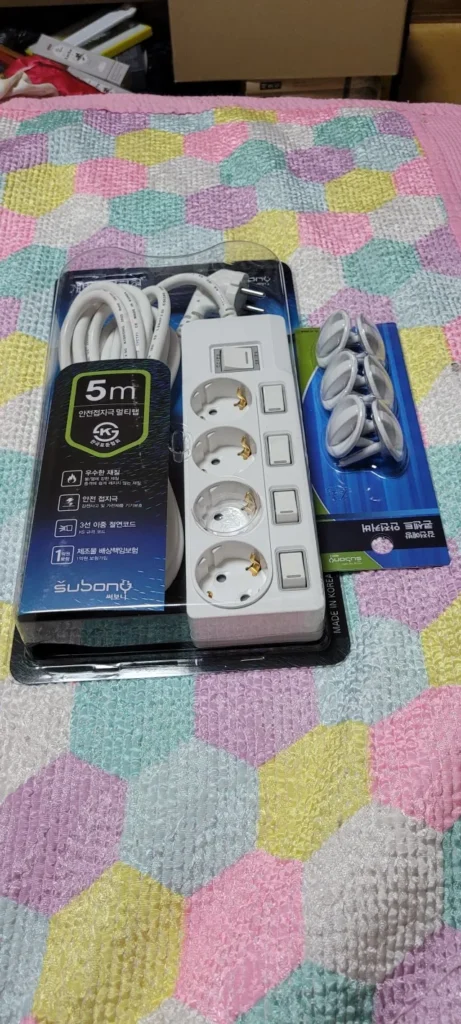
4구 과부하차단 멀티탭 선택 기준
4구 멀티탭을 찾는 이유는 대개 비슷합니다.
3구는 하나가 모자라고, 6구는 자리가 넓지 않은 곳에서 길게 느껴집니다.
그래서 책상과 TV장, 침실처럼 네 개 안팎의 전원을 쓰는 자리에는 4구가 가장 먼저 떠오릅니다.
여기에 개별스위치와 별도 과부하차단 스위치, 접지 구조, 맞는 전선 길이까지 맞추면 생활 속 전원 자리가 훨씬 단순해집니다.
1m, 2m, 3m, 5m 중 무엇을 고를지부터 정하고, 연결할 기기를 미리 적어 보면 제품 선택이 어렵지 않습니다.
써보니 4구 멀티탭은 한 자리를 과하게 채우기보다 필요한 전원을 차분히 나눠 쓰려는 집에 잘 맞습니다.
본체 길이와 전선 길이, 스위치 구성까지 설치할 공간에 맞춰 고르면 멀티탭 하나를 바꾼 뒤에도 가구 주변이 어수선해지지 않습니다.
써보니 멀티탭 3D로 비교하기
크게 보기 ↗Why Four Outlets Often Fit a Home Better
Choosing a power strip usually starts with a simple question: how many outlets are needed? Three outlets can be filled sooner than expected, while a six-outlet body may feel unnecessarily long under a desk or behind a TV cabinet. A four-outlet power strip often sits in the middle of those two options. It leaves enough room for a monitor, router, speaker, and charger without turning a small power area into a long row of unused sockets.
This is why a four-outlet layout works well in places where a few devices stay connected every day. A desk may have a monitor adapter, laptop charger, desk lamp, and small speaker. A TV cabinet may have a television, set-top box, router, and soundbar. In both cases, a four-outlet power strip gives each device a clear place without inviting users to keep adding more equipment just because extra sockets are available.
The best arrangement is not the one with the most empty sockets. It is the one that matches the actual devices in the room. When every plug has a planned place, it becomes easier to trace a cable, turn off an unused device, and keep the power strip from disappearing behind furniture where it cannot be checked.
Individual Switches and a Separate Overload Protection Switch
An individual switch power strip helps separate devices that need to stay on from devices that do not. A speaker, lamp, charger, or monitor can be turned off at its own switch without interrupting every device on the strip. That is useful at a desk, bedside table, or TV cabinet where the same devices are connected for long periods but are not always used at the same time.
On Subony four-outlet lines, the individual switches are paired with a separate overload protection switch. The two serve different parts of the setup. Individual switches control each outlet, while the separate switch turns the entire power strip on or off. That main switch also includes the overload-protection mechanism. It remains a normal full-power switch for everyday use, while the protective function is there for an overload situation.
That distinction matters when a power strip is used as part of a permanent home setup. Switches make the routine easier, but they do not replace sound electrical choices. Avoid daisy-chaining power strips, keep the cable visible enough to inspect, and choose the model by the type of equipment that will be connected rather than by the switch count alone.
Choosing Between 1m, 2m, 3m, and 5m Cables
Cable length changes the result more than many buyers expect. A 1m cable works well when the wall outlet is close to the desk, shelf, or TV cabinet. It keeps excess cable from piling up behind furniture. A 2m cable gives a little more freedom when the outlet is beside the furniture rather than directly behind it. For a living room or desk that needs to route a cable around a cabinet, 3m often makes more sense.
A 5m power strip is useful when the outlet is genuinely farther away or when the cable has to travel along a wall to stay out of a walking path. It is not automatically the better choice. Extra cable still needs to be routed without being trapped under furniture, pulled tight, or left in a thick coil. Measuring the path from the wall outlet to the intended location is a much better guide than simply choosing the longest cable.
Take the measurement from the wall outlet to the final resting place of the power strip, not just to the closest edge of the furniture. The plug needs room to enter the wall outlet, the cable needs a calm route, and the strip needs to remain accessible. This small check prevents the common problem of buying a cable that reaches only when it is pulled tight.
A Practical Four-Outlet Layout for Desks and TV Cabinets
At a desk, a four-outlet power strip is often easier to manage than a larger model. A monitor, laptop adapter, speaker, and router already account for most of the available sockets. If every plug has a fixed place, the cables are easier to trace later. The individual switches also make sense for devices that are only used during work or study hours.
The same idea applies behind a TV cabinet. Television equipment tends to remain connected for a long time, and the cabinet space is usually shallow. A compact four-outlet body can fit without extending too far beyond the furniture. Before installing it, check that plugs are not pressed against the cabinet, that the cable is not bent sharply, and that the wall outlet itself feels secure. Good cable management starts with enough room around the connection points.
For both locations, it is worth leaving a little visual space around the strip instead of packing it tightly behind equipment. A power strip that can be reached easily is simpler to clean, simpler to inspect, and less likely to be moved roughly when furniture or cables are adjusted. The goal is a stable everyday installation, not a hidden bundle of plugs.
A Four-Outlet Power Strip Should Match the Devices Connected to It
A four-outlet power strip is a strong everyday choice for small electronics and home entertainment equipment, but outlet count alone never decides whether a setup is appropriate. High-wattage appliances, especially products that make heat or run with high electrical demand, need their own product-specific guidance and rated-capacity check. They should not be added casually to a desk or TV power strip because a socket happens to be free.
For ordinary home power areas, the best setup is straightforward: choose the cable length that reaches comfortably, leave enough plug clearance, use individual switches for the devices that need them, and keep the power strip where it can be seen and cleaned. A Subony four-outlet overload protection power strip is designed around that kind of daily arrangement: enough outlets for the devices people actually use, without the unnecessary bulk of a larger strip.
A four-outlet strip is often chosen because it solves a familiar home problem without adding another one. It gives a practical number of outlets, keeps the body compact, and lets the cable length follow the room. When the equipment and the placement are considered together, the power area stays easier to use long after the first installation.
추가 정보
4구 과부하차단 멀티탭은 책상, 거실 TV장, 침실 협탁처럼 전자기기를 네 개 안팎으로 쓰는 자리에서 자주 찾게 됩니다. 3구보다 여유가 있고 6구보다 본체가 길지 않아, 실제 설치했을 때 공간을 덜 차지합니다.
써보니 4구 멀티탭은 개별스위치와 별도 과부하차단 스위치를 함께 보는 구성입니다. 스위치 수만 보지 말고 벽 콘센트와의 거리, 플러그 방향, 전선이 지나가는 길, 연결하는 기기의 종류를 같이 생각해야 합니다.
1m, 2m, 3m, 5m는 단순한 옵션이 아니라 배치 방식의 차이입니다. 가까운 책상에는 짧은 선이, 가구를 돌아가야 하는 거실에는 조금 더 긴 선이 맞습니다. 남는 선을 많이 감아 두는 방식보다는 필요한 만큼만 여유가 있는 길이가 관리하기 편합니다.
4구 멀티탭 선택 포인트
- 3구가 자주 부족하고 6구가 길게 느껴지는 자리에는 4구 구성이 잘 맞습니다.
- 모니터, 공유기, 스피커, 충전기처럼 소형 전자기기를 나눠 연결하기 좋습니다.
- 개별스위치는 각 기기를 따로 끄는 데 쓰고, 별도 과부하차단 스위치는 전체 전원을 켜고 끄는 메인 스위치이면서 과부하차단 장치를 함께 갖춘 구조입니다.
- 1m는 콘센트와 가구가 가까운 자리, 2m와 3m는 책상이나 거실장 주변, 5m는 벽을 따라 선을 빼야 하는 자리에 어울립니다.
- 플러그가 가구에 눌리지 않는지, 전선이 접히거나 당겨지지 않는지 설치 전에 확인합니다.
- 열을 만드는 고전력 가전은 일반 전원 정리 자리와 따로 보고 제품 설명서와 정격에 맞춰 연결합니다.
공간별 4구 멀티탭 배치
책상 아래
모니터와 노트북 충전기, 공유기, 스피커가 모이는 자리입니다. 발에 차이지 않는 쪽으로 본체를 두고, 1m나 2m처럼 남는 선이 적은 길이를 먼저 봅니다.
거실 TV장
TV, 셋톱박스, 사운드바, 공유기를 나눠 쓰기 좋습니다. 가구 뒤쪽으로 선을 돌려야 하면 2m나 3m를 고르고, 플러그가 뒤판에 눌리지 않게 간격을 둡니다.
침실 협탁과 화장대
조명, 충전기, 소형 가전처럼 필요한 전원이 한정된 자리입니다. 멀티탭이 침구 아래나 커튼 가까이에 숨지 않도록 보이는 위치에 두는 편이 낫습니다.
사무실 개인 자리
모니터와 노트북 어댑터, 전화기 충전기처럼 업무 중 켜고 끄는 기기가 섞입니다. 개별스위치가 있으면 퇴근할 때 필요한 자리만 끄기 편합니다.
자주 묻는 질문
4구 멀티탭은 어떤 공간에 가장 잘 맞나요?
1m와 2m 중 어느 길이를 고르면 되나요?
3m와 5m는 언제 필요한가요?
개별스위치와 과부하차단 스위치는 같은 기능인가요?
과부하차단 기능이 있으면 고전력 가전을 여러 개 연결해도 되나요?
4구에 플러그를 모두 꽂아도 괜찮나요?
전선은 가구 뒤에 숨겨도 되나요?
멀티탭은 언제 교체해야 하나요?
관련 페이지
써보니 브랜드 페이지, 써보니 공식몰, 써보니 스마트스토어에서 제품 구성과 길이 옵션을 확인할 수 있습니다.